You have asked three agencies the same question. One told you six weeks. One told you eight months. The third sent a discovery questionnaire and went silent. Every founder we speak to has a version of this story, and the frustration is real.
Here’s what’s happening: each agency might be right. This isn’t salesmanship; it reflects real differences in scope, backend complexity, design readiness, and integrations. The real issue: none explained which project version they were quoting.
This post provides direct clarity. As a native mobile app development company, we have delivered iOS apps across four complexity tiers for clients in India, the USA, the UK, the UAE, and Australia. We’re now sharing actual project data, not secondhand averages. By the end, you will clearly understand which factors drive timelines and be able to estimate your own iPhone app development project within a two-week margin, before speaking to any agency.
The short answer, before the detailed breakdown:
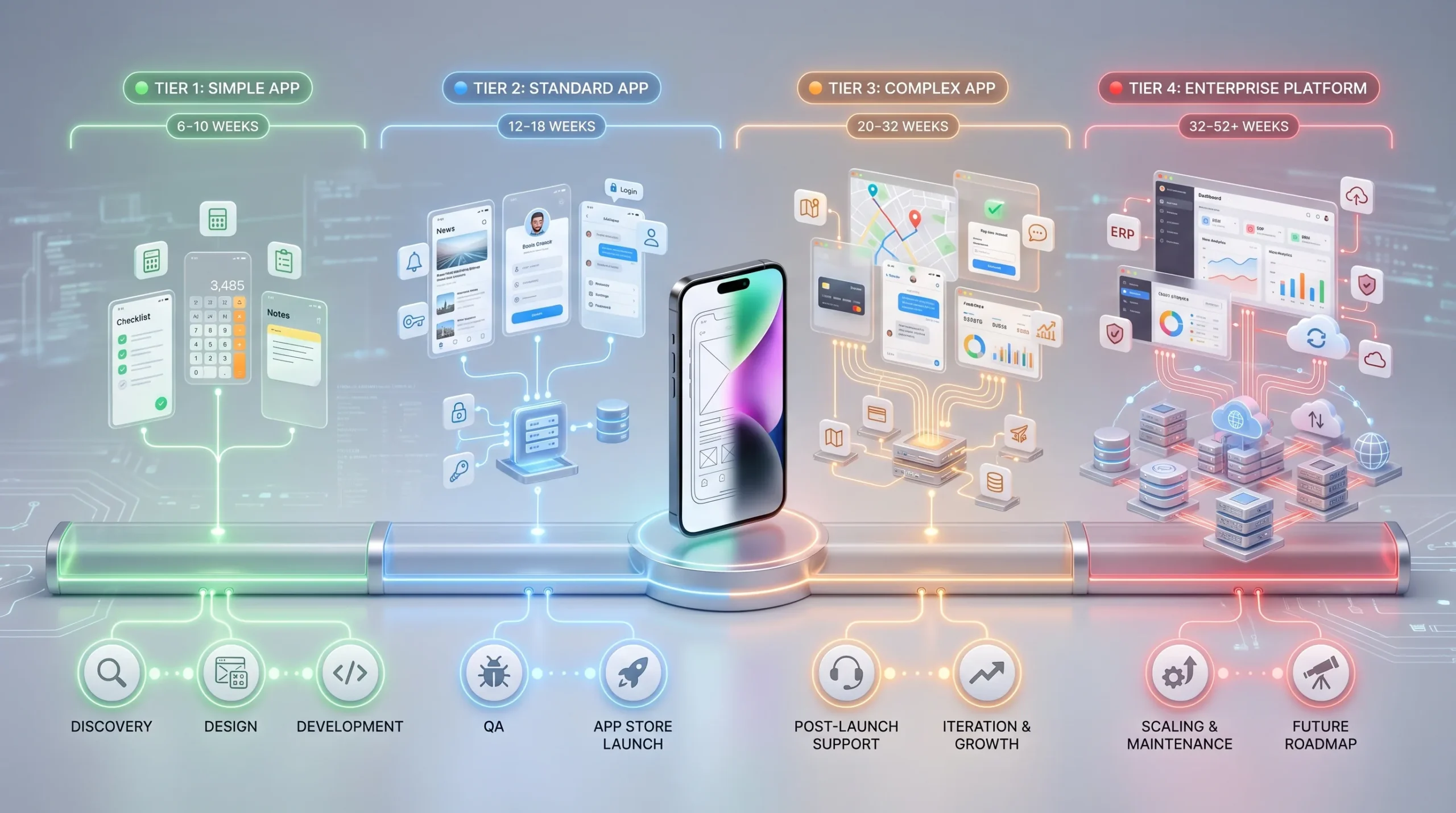
| App Type | Team Size | Realistic Timeline |
| Simple app (1 to 3 screens, basic logic) | 2 developers | 6 to 10 weeks |
| Standard app (5 to 12 screens, backend, auth) | 3 to 4 developers | 12 to 18 weeks |
| Complex app (15+ screens, API integrations, real-time features) | 4 to 6 developers | 20 to 32 weeks |
| Enterprise iOS platform (ERP, LMS, CRM integration) | 5 to 8 developers | 32 to 52 weeks |
The Four Variables That Actually Determine Your Timeline
App development timelines are not arbitrary and hinge on four core factors. Understanding how scope, backend complexity, design readiness, and integrations impact your timeline is crucial. Every estimate we produce at StudioKrew begins with these four questions, and so should yours. Focusing on these variables is the most reliable path to an accurate timeline.
1. Feature scope and screen count
Screen count is the single most reliable early proxy for timeline. As a rule of thumb, each unique screen with custom logic adds approximately 3-5 development days. The mistake most founders make is counting only the “main” screens and missing edge states and transitions. A food delivery app has an order screen, along with loading, empty cart, out-of-stock, order confirmed, order tracking, and delivery confirmed states. That is six states for one screen. An app with “10 screens” often has 30 distinct UI states, each requiring time for design, development, and testing.
2. Backend complexity
A purely offline app with no backend can reduce the overall timeline by 20-30%. Adding a simple CRUD backend with a REST API, user authentication, and push notifications adds 3 to 4 weeks to a standard project. Adding real-time features such as WebSocket connections, live chat, or live scoring, along with complex business logic and third-party API integrations, adds 8 to 16 weeks. Payment gateway integration alone (Stripe, Braintree, or Razorpay) typically adds 1 week, including compliance testing.
3. Design starting point
Starting with no design assets adds 3-5 weeks to the timeline for wireframes, a prototype, and production-ready Figma files. Partial brand guidelines and existing screens add 2-3 weeks. Complete, high-fidelity Figma designs with all states can reduce the development timeline by 1 to 2 weeks because developers have no ambiguity to resolve. Incomplete design at handoff is the most common source of scope creep in mid-project. Developers who build from partial specs end up rebuilding, and those costs are not accounted for in almost any initial estimate.
4. Integration and compliance requirements
Each third-party integration adds 3 to 10 days, depending on API quality and documentation. Frameworks such as HealthKit, ARKit, and Core ML each add 1 to 3 weeks for a correct, production-grade integration. HIPAA, GDPR, or PCI-DSS compliance adds 2 to 4 weeks of architecture work and security review, plus time for App Store privacy documentation. App Store age rating and content compliance typically take 1 to 3 days for standard apps and up to 2 weeks for apps with user-generated content, payments, or in-app subscriptions.
Realistic Timelines by App Type: What We Actually See in Projects
Working with an experienced iOS app development company gives you access to project data across all four tiers. Here is what those timelines look like in practice.
Simple Utility App: 6 to 10 Weeks
Examples: a habit tracker, an offline reference tool, a calculator-style utility, a single-feature B2C tool.
These apps have 1 to 3 screens with deterministic logic, no backend or a minimal API, no payments, and no real-time features. The team typically consists of one iOS developer and a part-time designer. What pushes a simple app to 10 weeks rather than 6: late design sign-off, an App Store rejection on the first submission (which adds 5 to 7 days on average), or scope additions after development has started.
Standard Consumer iOS App: 12 to 18 Weeks
Examples: a food ordering app, a fitness tracker with user accounts, a marketplace, and a content and news platform.
These apps involve 6 to 12 screens, a backend, user authentication, and push notifications. A payment integration or subscription model pushes the estimate toward the upper end. The team typically consists of 2 iOS developers, 1 backend developer, and 1 designer. What pushes it to 18 weeks: custom animations requested after wireframes are signed off, a payment gateway change mid-development, or an iOS version release during development. September launches pose particular risk for projects mid-sprint during Apple’s annual update cycle.
Complex iOS App: 20 to 32 Weeks
Examples: an on-demand service platform, a real-time multiplayer game, a telemedicine app, a fintech platform.
These projects involve 12 to 20 screens or more, real-time features, complex business logic, and multiple third-party integrations, such as maps, payments, video calling, and analytics. The team is 3 to 5 iOS developers, 1 to 2 backend developers, and 1 to 2 designers. What pushes the timeline to 32 weeks: compliance requirements discovered mid-project, API dependencies on third parties with slow response times or poor documentation, or a real-time architecture that requires rethinking after initial load testing.
Enterprise iOS Platform: 32 to 52 Weeks
Examples: a field operations app for 5,000 users, an LMS platform with offline sync, and an ERP mobile interface.
These platforms require custom authentication (e.g., SSO, LDAP, or Azure AD), offline mode with complex sync logic, MDM compatibility with tools like Jamf or Intune, and multiple user roles with differentiated permissions. The team is 5 to 8 developers, 2 QA engineers, a dedicated project manager, and 1 to 2 designers. What pushes these to 52 weeks: enterprise procurement and IT security review processes, custom security audit requirements, and integration with legacy systems that have poor or undocumented APIs.
Phase by Phase: Where Your Timeline Actually Goes
According to a 2024 GoodFirms developer survey, 61 percent of projects that ran over deadline skipped or compressed the discovery and planning phase. Most founders think app development begins when a developer opens Xcode. It does not. Here is where the calendar time actually goes.
Phase 1: Discovery and Scoping (1 to 2 weeks)
Feature list finalization, technical architecture decisions, and third-party API identification. Output: a scope document, milestone plan, and a fixed-cost estimate or resource plan. What delays it: the founder’s unavailability for requirements sessions and legal review of contracts or NDAs.
Phase 2: UX Wireframing (1 to 3 weeks)
Low-fidelity wireframes for all screens and user flows. Output: a clickable wireframe prototype for stakeholder sign-off. What delays it: stakeholder disagreement on user flows and revision cycles without a structured sign-off process.
Phase 3: UI Design (2 to 4 weeks)
High-fidelity visual design following Apple’s Human Interface Guidelines (HIG), covering all screens and all states: loading, empty, error, and dark mode where required. Output: a production-ready Figma file handed to development. What delays it: brand guidelines conflict with iOS HIG conventions, and there are multiple rounds of visual feedback without a structured approval gate.
Phase 4: Development (Variable, see Section 3)
Sprint-based delivery with TestFlight builds every 2 weeks. Backend development runs in parallel with frontend development, where possible. Output: a working iOS app with all features complete and internally tested.
Phase 5: QA and Testing (1 to 3 weeks)
Device testing across iPhone models and iOS versions; functional, regression, and performance testing; and an accessibility audit. What delays it: late-stage feature additions that require regression testing from the start, and devices behaving differently from the simulator.
Phase 6: App Store Submission and Review (1 to 2 weeks)
App Store Connect setup, metadata, screenshots, privacy policy, and age rating. According to Apple’s Developer Documentation, most updates are reviewed within 24 to 48 hours, while new app submissions typically take 3 to 7 days. The first submission rejection rate for new apps is higher than most founders anticipate in 2026. Common reasons for rejection include incomplete privacy disclosures, in-app purchase flows that do not comply with Apple’s guidelines, and age rating errors. Each rejection and resubmission adds 3-7 days. For context, Statista reports that the iOS App Store now contains over 1.8 million apps, which reflects why Apple’s review process has grown more thorough over time.
Phase 7: Post-Launch Stabilization (2 to 4 weeks)
Crash monitoring, user feedback triage, and performance hotfixes. This phase is not optional for production apps. An app launched without a post-launch support plan will accumulate 1-star reviews from early adopters who encounter stability issues that go unaddressed.
Why Most iPhone App Projects Miss Their Deadline, and How to Avoid It
In our experience, delays are predictable. They come from the same four sources in almost every project. Clutch.co’s B2B research from 2024 reports that clients experience mobile app development timelines ranging from 3 to 9 months across complexity tiers, a range that reflects not just differences in scope but also how well these four risks are managed.
1. Scope additions after development begins
This is the most common cause of timeline overruns, without exception. Adding a referral system to a marketplace app after the user authentication system is built requires changes to the user schema, the invite flow, the notification system, and the analytics layer. That is not one day of work. The fix: enforce a scope freeze after wireframe sign-off. New features go into a v2 backlog, not the current sprint.
2. Incomplete design handoff
Developers who receive Figma files with missing states, such as loading, empty, error, and edge cases, make decisions on the fly. Those decisions are frequently wrong and require UI rebuilds later. The fix: require complete design files covering all states, all device sizes, and all edge cases before development begins. Run a design QA review beforehand.
3. Third-party API dependencies
Every integration with a third-party API introduces a timeline dependency you do not control. A payment gateway that works correctly in the sandbox may require 3 to 5 days of debugging when moved to production due to undocumented differences in currency handling. The fix: identify all third-party dependencies during discovery and test the sandbox environment before committing to the timeline. This is a core part of our Swift app development process.
4. Stakeholder availability and decision lag
Projects stall when the founder or product owner is unavailable to approve wireframes, designs, or scope decisions. A 3-day approval delay per sprint across a 20-week project can add 4 calendar weeks. The fix: Establish a decision SLA in the project contract. Unanswered approvals after a defined window are treated as accepted.
How Team Size and Location Affect Your iPhone App Timeline
Team Size and Timeline: The Non-Linear Relationship
Adding developers does not proportionally reduce the timeline. Brooks’s Law applies: adding people to a late software project makes it later. The optimal team for a standard consumer iOS app is 3 to 4 people: 2 iOS developers, 1 backend developer, and 1 designer. Adding a fifth developer introduces coordination overhead that absorbs approximately 30 percent of their productive output. For enterprise iOS platforms, 5 to 8 people is right, but only with a dedicated project manager. Without a PM, each developer spends 15-20% of their time on coordination tasks.
Offshore iOS Development in India: What Changes and What Does Not
The phases still exist. The testing requirements are the same. App Store reviews take the same amount of time regardless of where the developers are. What changes is the time zone overlap, which is 4.5 to 10 hours depending on the client’s market. The practical impact on the timeline: a team with a disciplined async communication process incurs approximately 1 to 2 days of decision-making latency per sprint compared to a co-located team. Over a 20-week project, that is 2 to 4 weeks of calendar time if unmanaged, and negligible if managed well.
If you are looking to hire iOS developers or are considering working with an iOS app development company in India, the output is comparable to local development at 60-70% lower cost, provided communication is structured.
The Timeline Does Not End at Launch: What to Plan for Post-App Store
Most founders plan for the build. Almost no one plans for what happens after. Here is what the post-launch calendar actually looks like.
Apple releases a major iOS version every September and minor updates every 4 to 8 weeks. Each major release requires compatibility testing and, frequently, code updates. Budget 1 to 2 weeks of developer time per year for iOS compatibility maintenance.
The first 4 weeks after launch always surface edge-case bugs that testing missed. Budget 1 dedicated developer for 2 to 4 weeks post-launch for crash monitoring and hotfixes.
Most apps require a v1.1 update within 6 to 8 weeks of launch based on user feedback. Plan for that sprint before launch, not after. App Store metadata updates, including seasonal screenshots, promotional banners, and updated descriptions, each require 24 to 48 hours for App Store review.
For structured app maintenance and LiveOps, a planned support engagement prevents the pattern we repeatedly see: apps that launch well but stagnate within 90 days due to a lack of post-launch resourcing.
The apps that grow are the ones with a structured post-launch plan. The apps that stagnate are those whose development contracts ended at launch.
How to Estimate Your Own iPhone App Timeline in 15 Minutes
You do not need to speak to an agency before arriving at a working estimate. Here is the framework we use internally, shared as a self-serve tool.
Step 1: Count your screens, including all states.
List every screen. For each screen, count how many states it has: loading, empty, populated, error, and success. Multiply your total UI state count by 3 to 5 working days. This gives you a rough estimate for iOS frontend development. A 10-screen app with 3 states per screen is 30 states, at 3 to 5 days each, for a total of 90 to 150 development days before backend, design, or testing.
Step 2: Classify your backend complexity.
No backend: add 0 weeks. Simple CRUD backend with authentication: add 4 weeks. Complex real-time or third-party-heavy backend: add 8 to 16 weeks. If you are unsure, assume complex until you know otherwise.
Step 3: Add your integration count.
Each third-party integration, such as payment processing, maps, analytics, social login, and push notifications, adds 3 to 7 days. List all of them now, including the ones you might add later. It is better to know the full number before the timeline is set than to discover it mid-sprint.
Step 4: Add design time if you do not have complete Figma files.
No design: add 4-6 weeks. Partial design: add 2-3 weeks. Complete, production-ready Figma with all states: add 0 weeks. Partial designs almost always produce partial estimates that later become full estimates.
Step 5: Add a 20 percent buffer.
Every project has at least one unknown that adds time. A founder who builds a 10 percent buffer and encounters a 20 percent overrun will miss their launch date. A founder who builds a 25 percent buffer and encounters a 20 percent overrun will launch on time and feel in control. Build in the buffer before you present the date to your board or client.
Confuse about tech-stack to choose for iOS App Development? Read: Swift vs React Native vs Flutter: Which Is Right for Your iOS App in 2026?
Frequently Asked Questions: iPhone App Development Timelines.
Q1: How long does it take to build a simple iPhone app?
In our experience, a simple iPhone app with 1 to 3 screens, basic logic, and no backend takes 6 to 10 weeks to develop, assuming design is already complete. If the design starts from scratch, add 2-3 weeks. The most common reason simple apps take longer than expected is scope additions during development: features that appear minor but touch the data model and require rebuilding existing functionality. A feature that seems like one extra field often changes the API contract, the database schema, and three related screens.
Q2: Can an iPhone app be built in 4 weeks?
A functional prototype (MVP) with 1 to 2 screens and no backend can be delivered in 4 weeks with the right team. A production-grade, App Store-ready app cannot. App Store review alone takes 5 to 14 days for a new submission. Any developer quoting 4 weeks for a complete, publishable app is either describing a prototype or planning to cut corners on QA and testing. If a 4-week deadline is non-negotiable, define exactly which features and screens will be included before the sprint starts, and treat everything else as v1.1.
Q3: How long does Apple App Store review take in 2026?
Most app updates are reviewed within 24 to 48 hours, according to Apple’s Developer Documentation. New app submissions typically take 3 to 7 days. First-time submissions involving in-app purchases, subscriptions, or user-generated content take longer because they trigger additional review steps. Rejected apps that are resubmitted restart the review clock. Our standard practice is to build a 2-week buffer into every launch plan to cover App Store review and any resubmissions due to rejections. Do not commit to a public launch date that does not include this buffer.
Q4: Does hiring an iOS development company in India take longer than hiring locally?
Development quality and output are comparable. The timeline difference, when it exists, is in communication overhead: typically 1 to 2 days per sprint in decision latency due to time zone differences when communication is not structured. With a disciplined async-first process, including daily written updates, TestFlight builds every 2 weeks, and defined approval SLAs, an India-based team delivers on the same timeline as a local team at 60-70 percent lower cost. The projects that run late are those with no communication structure, not those with an offshore team.
Q5: What is the most common cause of iPhone app development delays?
Scope additions after development begins. Without exception, this is the most frequent cause of timeline overruns in our project history. The second most common is incomplete design at handoff: developers who build from wireframes with missing states make assumptions that need to be rebuilt later. Both are preventable with a proper discovery phase, a scope freeze after wireframe sign-off, and a design QA review before development starts. These are not optional process steps. They are the difference between projects that hit their launch date and projects that do not.
The Bottom Line: How Long Will Your iPhone App Take?
You have a launch date in mind. The question is whether it is realistic. The answer lives in four variables: scope, backend complexity, design readiness, and integration count. All four can be estimated before a single line of code is written. The founders who hit their launch date are the ones who invested 2 weeks in discovery before the first sprint, not the ones who skipped it to “save time.”
The fastest way to get an accurate timeline estimate for your specific project is to share your feature list and launch target with us in a 30-minute scoping call. We will give you a milestone plan, a timeline range, and an honest assessment of whether your date is achievable.
Book a free iOS project scoping call and leave the call with a number you can actually use.






 INDIA
INDIA CANADA
 USA
USA UAE
UAE