AI chatbots are rapidly becoming a practical layer in modern business operations. What started as simple, scripted support widgets has evolved into a far more capable system that can answer questions, guide users, assist teams, and automate repetitive interactions across multiple channels. For many businesses, the real question is no longer whether chatbots are useful, but how they actually work and where they create measurable value.
That is where much of the confusion still exists. Some businesses see AI chatbots as a quick plug-in for customer support. Others expect them to fully replace service teams or act like an all-knowing assistant from day one. In reality, the business value of an AI chatbot depends on how well it is designed, which systems it can access, how safely it handles responses, and whether it is aligned with real operational goals, such as reducing support load, improving lead conversion, or speeding up internal workflows.
This guide breaks that down in practical terms. It explains how modern AI chatbots work, where they fit best, how different chatbot models compare, what metrics matter, and what businesses should plan before implementation. Whether the goal is to improve customer support, launch a custom AI chatbot solution, explore Generative AI development services, or build broader AI-powered business software, the key is understanding the technology in a way that connects directly to outcomes, not just features.
Effective AI chatbot deployments are based on business logic, trusted data, clear workflows, and measurable performance—not hype. This article takes that approach.
What an AI Chatbot Is (and what it is not)
Before evaluating features, integrations, or ROI, it helps to clarify one of the most common misunderstandings in the market: many businesses think they are buying a chatbot when, in reality, they are only looking at a chat interface. That distinction matters. A chat window may look impressive in a demo, but business value comes from the system behind it, not from the box where users type messages.
What is a Chat UI?
A chat UI is the visible front-end layer of a conversational experience. It is the interface a user sees on a website, inside an app, on WhatsApp, or in a workplace tool like Slack or Microsoft Teams. It includes the message box, buttons, quick replies, file attachments, typing indicators, and the overall conversation design.
In simple terms, the chat UI is the communication surface. It helps users ask questions in a familiar, low-friction way. But on its own, it does not make the chatbot intelligent, reliable, or useful. A chat UI can exist without automation, AI, or even real logic. It is just the point of interaction.
What is an Automation System?
An automation system is the functional engine behind the conversation. This is where the actual business value is created. It includes the rules, AI models, connected data sources, APIs, workflows, escalation logic, and actions that power the response.
For example, if a customer asks for an order update, the automation system checks the order database, pulls the correct status, formats the response, and decides whether to keep the conversation automated or route it to a human agent. If a prospect asks about pricing, the automation system may qualify the lead, identify intent, push data into a CRM, and trigger the next step for the sales team.
Without this layer, the experience may still look like a chatbot, but it is only a conversational shell.
The Difference Between Chat UI and Automation System
This is where many chatbot projects go wrong. Businesses often judge chatbots by how polished their interfaces look, while real success depends on what happens beneath the surface.
A chat UI is about how the conversation is presented. An automation system is about how the conversation produces outcomes.
The difference becomes even more important when expectations are tied to accuracy, escalation, and scope. A business-ready chatbot must do more than respond fluently. It must know:
- what it can answer confidently
- when it needs to retrieve approved information
- when it should trigger an action
- when it must escalate to a human
That is why a strong implementation is not just about adding a widget to a website. It is about building a workflow layer that supports customer service, lead handling, internal assistance, and operational efficiency in a controlled, measurable way.
When You Should Not Use a Chatbot
Not every process should be turned into a chatbot flow, and forcing one into the wrong use case usually creates frustration rather than efficiency.
A chatbot may not be the right fit when:
- the workflow requires exact legal, financial, or compliance wording with no room for interpretation
- every step must follow strict approval logic
- the user task is better completed through a simple form, dashboard, or direct human interaction
- the business does not yet have clean knowledge sources or clear escalation paths
- the team wants “automation” but has not defined the business problem it needs to solve
This is an important filter, because a chatbot should not be added just because conversational AI is trending. It should only be implemented where it reduces effort, improves access, or helps users move faster through a process.
In many cases, a hybrid solution works better. A business may use conversational AI for discovery, guidance, and first-level handling, while relying on structured rules, forms, or human teams for the final action. That is often where the most practical value comes from.
How Chatbots Fit Into the Buyer Journey
When implemented correctly, chatbots do not just answer questions. They improve the economics of customer interaction.
For support teams, a chatbot can reduce repetitive ticket volume by handling common queries instantly, surfacing approved answers, and escalating only when needed. This helps reduce response pressure on human teams while improving service availability.
For sales teams, a chatbot can qualify inbound traffic, answer product or pricing questions, guide users toward the right service, and capture lead intent before a human conversation even begins. That means higher conversion efficiency, especially for businesses dealing with repetitive pre-sales questions.
For operations and internal teams, a chatbot can reduce time spent searching across documents, tools, and disconnected systems. Instead of making employees hunt for SOPs, policy details, project updates, or process steps, the chatbot becomes a faster access layer for business knowledge.
That is why the conversation around chatbots has shifted. Businesses are no longer evaluating them only as support tools. They are evaluating them as systems that can:
- reduce tickets
- increase conversions
- accelerate operations
And that is exactly where the real value begins, not in the interface, but in the outcomes it helps create.
AI Chatbot Definition, in Simple Business Terms
AI chatbots are often discussed as if they are all the same. In practice, they are not. For a business evaluating implementation, the most useful starting point is a clear set of definitions. Once the terms are understood properly, it becomes much easier to choose the right chatbot model, set realistic expectations, and avoid buying the wrong solution for the wrong problem.
What is an AI Chatbot?
An AI chatbot is a conversational system that uses artificial intelligence to understand a user’s request and respond in natural language. Unlike older scripted bots, it is not limited to exact keywords or fixed button flows. It can interpret different ways of asking the same question, handle follow-up messages, and respond more flexibly.
In business terms, an AI chatbot is useful when users want a faster, more natural way to get help, whether that means asking about services, checking order details, understanding policies, or getting guided toward the next step. It reduces friction because users do not need to learn a command structure. They can simply ask.
What is a Generative AI Chatbot?
A Generative AI chatbot is a more advanced type of AI chatbot that uses large language models to generate responses dynamically. Instead of selecting only from prewritten answers, it can create context-aware replies in real time, summarize information, rephrase explanations, and handle a wider range of conversational inputs.
For businesses, this matters when conversations go beyond simple FAQs. A generative chatbot can help explain complex services, respond in a more personalized tone, support sales conversations, and make the interaction feel more human. However, this added flexibility also means it must be controlled carefully. If it is not grounded in approved business knowledge, it can sound confident even if it is wrong.
That is why many companies exploring advanced chatbot experiences also invest in Generative AI development services to build stronger knowledge retrieval, response controls, and workflow logic around the model.
What is an Enterprise Chatbot?
An enterprise chatbot is a chatbot built for real business operations, not just for demonstration or surface-level engagement. It is designed to work within actual business systems, service processes, access controls, and performance goals.
This type of chatbot often connects with:
- CRM platforms
- helpdesk systems
- ERP tools
- internal documentation
- product or service databases
- lead capture and workflow systems
In simple terms, an enterprise chatbot is expected to do more than chat. It must answer accurately, log interactions, follow business rules, support escalation, and fit into existing operations without creating risk or confusion. For that reason, businesses looking beyond a basic bot often need an experienced AI chatbot development company that can build with integrations, governance, and measurable business outcomes in mind.
A Quick Practical Distinction
These three definitions are closely related but not interchangeable.
- An AI chatbot focuses on understanding and responding more naturally.
- A Generative AI chatbot focuses on creating dynamic, context-aware responses using large language models.
- An enterprise chatbot focuses on applying those capabilities inside a real business environment with systems, controls, and accountability.
A business may use one or a combination of all three, depending on the workflow’s complexity, the level of risk involved, and the expected outcome.
Why These Definitions Matter Before You Buy
A lot of confusion in the market comes from vendors using the same word, “chatbot,” to describe very different products. Some tools are little more than smart interfaces. Others are full workflow systems connected to real business operations.
Understanding the difference early helps buyers ask better questions:
- Do we need better conversations or business automation?
- Do we need dynamic responses or fixed controlled workflows?
- Do we need a lightweight support bot or an enterprise-ready system connected to our operations?
The clearer these definitions are, the easier it becomes to choose a solution that actually reduces workload, improves the customer experience, and delivers measurable value rather than just sounding impressive in a demo.
How AI Chatbots Work
Once the definitions are clear, the next question is the one most business teams actually care about: what is happening behind the scenes when a user sends a message to an AI chatbot?
At a high level, an AI chatbot takes a user’s message, understands its intent, finds the appropriate context, and then generates or selects the most appropriate next response. That sounds simple on the surface, but in a business environment, several layers work together to make that response accurate, useful, and safe.
The Basic Flow Behind Every AI Chatbot
When a user types a question, the chatbot does not just “read” the sentence the way a human does. It first interprets the input to understand what the user is trying to achieve. That could mean asking for product information, checking order status, requesting support, or seeking policy guidance.
From there, the system typically moves through a sequence like this:
- understand the user’s intent
- identify the relevant context
- retrieve information, if needed
- generate or assemble the response
- decide whether to continue, trigger an action, or escalate
This flow is what turns a simple message into a useful business interaction.
Step 1: Understanding Intent
The chatbot’s first job is to interpret what the user actually means. This is important because users rarely ask questions in a perfectly structured way. One customer may write, “Where is my order?” Another may say, “I still have not received my package.” A sales prospect may ask, “Can you help me choose the right plan?” while another may simply say, “Need pricing.”
A modern AI chatbot is built to detect the intent behind those variations. Instead of relying solely on exact keywords, it uses language models and intent recognition to map different phrasings to a likely user goal.
In business terms, this is what makes the experience feel more natural. Users do not have to follow a script. They can ask in their own words.
Step 2: Adding Context
Understanding intent is only part of the job. A useful response also depends on context.
Context can include:
- what the user asked earlier in the conversation
- which page or app screen they are on
- who the user is, if they are authenticated
- what account, product, or order are they referring to
- what business rules apply to that specific request
This is the difference between a generic reply and a relevant one. If a customer asks, “Can I return this?”, the chatbot needs more than language ability. It may need order details, return policy rules, time limits, product category restrictions, or user history before giving a reliable answer.
Without context, even a fluent chatbot can still produce weak responses.
Step 3: Retrieving the Right Information
Many business chatbots should not rely only on the AI model’s memory. Instead, they need to fetch information from approved sources before answering. This is where retrieval becomes critical.
Depending on the use case, the chatbot may pull information from:
- a knowledge base
- FAQs and policy documents
- product catalogs
- internal SOPs
- helpdesk content
- CRM or ERP systems
- order databases or user records
This step helps the chatbot respond with greater accuracy and business relevance. If a support bot answers based on current policy documents rather than generic assumptions, the result is far more reliable. If a sales bot can pull real service information before responding, it becomes more useful for lead qualification.
This retrieval-led approach is often part of broader Generative AI development services, especially when businesses want the chatbot to work with live data, internal documentation, or structured system integrations.
Step 4: Generating the Response
Once the chatbot has the user’s intent and the right context, it prepares the response.
In some systems, the answer may be selected from a controlled library of approved responses. In others, especially generative systems, the chatbot may dynamically generate a response using a large language model. This allows the answer to feel more natural, more tailored, and easier to understand.
For example, instead of simply returning a raw policy line, the chatbot can explain the policy in simple terms, summarize a long answer, or format the response based on the user’s question.
This is where AI chatbots often feel more helpful than older bots. The response is not just technically correct. It is easier to consume.
Still, this is also the step where control matters most. A response that sounds polished but is based on weak data or lacks grounding can pose a risk. That is why businesses need more than just a model. They need a system designed for reliability.
Step 5: Taking Action or Escalating
A strong chatbot does not always end with an answer. In many business scenarios, the next step is action.
Depending on the workflow, the chatbot may:
- create a support ticket
- capture a lead in the CRM
- schedule a demo
- route the user to a sales or support rep
- fetch order details
- update a service request
- escalate the case to a human agent
This is what makes the chatbot operationally useful. It is not just answering. It is helping the user move forward.
When confidence is low, the issue is sensitive, or the request falls outside the approved scope, the chatbot should escalate rather than improvise. Good escalation design is one of the clearest signs of an enterprise-ready solution.
This is where working with an experienced AI chatbot development company becomes important, because the real value often comes from how the chatbot fits into your service flow, not just how it talks.
Why “Training the Chatbot” Is Often Misunderstood
A common assumption is that chatbot success depends mainly on “training the AI.” In reality, most business chatbot performance comes less from model training and more from system design.
What usually matters more is:
- the quality of the knowledge sources
- the clarity of prompts and instructions
- the response rules and fallback logic
- the integrations behind the scenes
- the evaluation process after launch
In other words, the business setup around the chatbot often matters more than fine-tuning the model itself.
This is one reason why chatbot implementation increasingly overlaps with broader AI software development. Businesses are not just adding a conversational layer. They are designing a connected digital system that needs logic, data flow, governance, and performance measurement.
The Real Takeaway
An AI chatbot works best when it combines conversation, context, retrieval, response generation, and action within a single, controlled system. It is not just a tool that talks. It is a service layer that helps users move from question to outcome.
That is why the most effective chatbot deployments are not judged by how impressive the conversation feels during testing. They are judged by whether the system can answer accurately, act reliably, and support real business goals at scale.
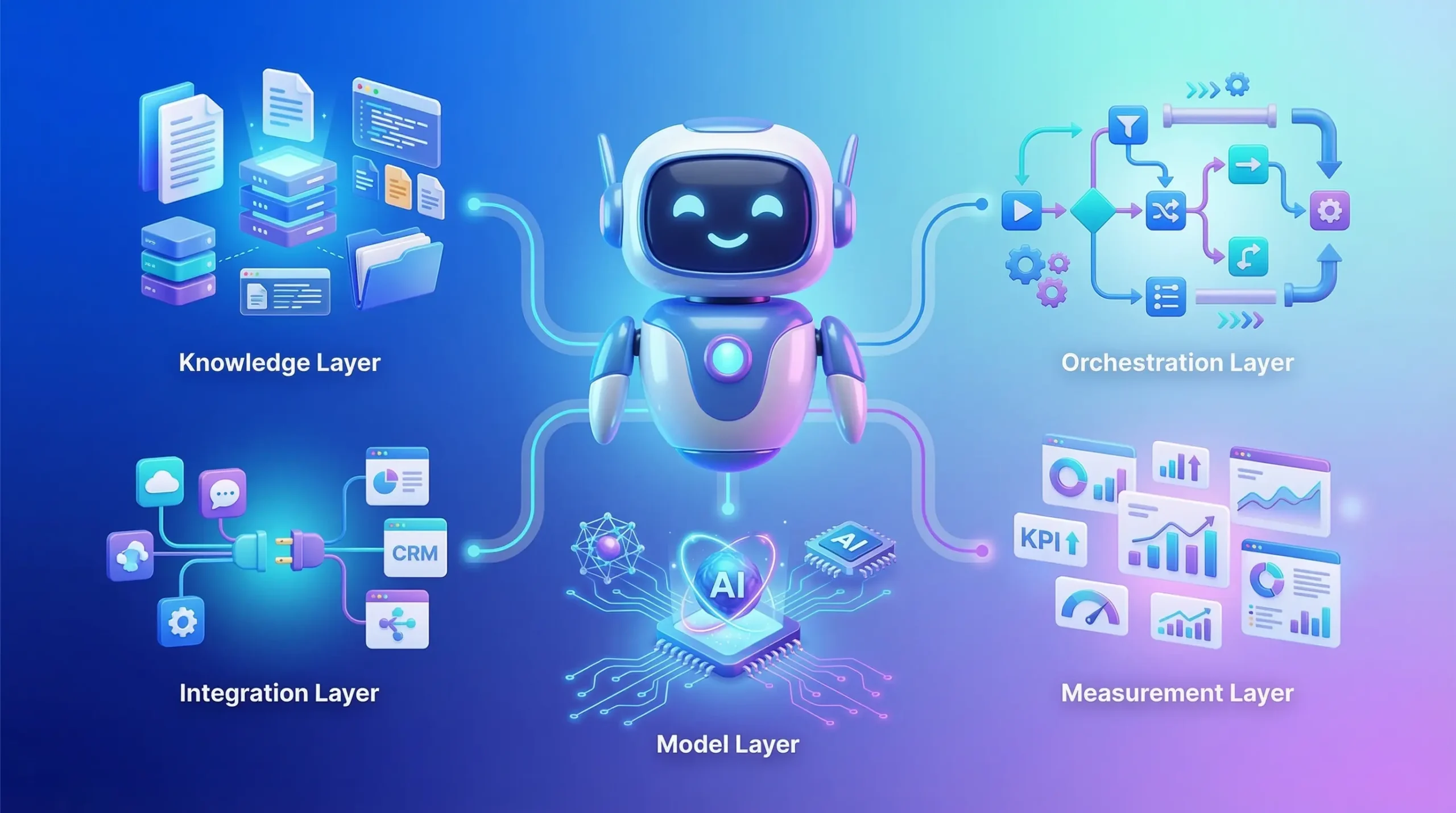
The 5 Building Blocks of a Production Chatbot
A chatbot may look simple from the outside, but a production-ready system is never just a chat interface connected to a model. The difference between a demo bot and a reliable business chatbot usually comes down to the foundation on which it is built. If that foundation is weak, the chatbot may still sound fluent, but it will struggle with accuracy, consistency, security, and real business usefulness.
For a chatbot to perform well in live business environments, five core building blocks need to work together.
1. The Knowledge Layer
The knowledge layer provides the chatbot with its factual grounding. This can include FAQs, help center content, policy documents, product information, internal SOPs, pricing details, catalog data, and structured business records.
Without a robust knowledge base, the chatbot is forced to rely too heavily on general model behavior, increasing the risk of vague or incorrect answers. In contrast, when the chatbot can draw on approved, up-to-date sources, its responses become far more useful in real business scenarios.
This layer is especially important for support, onboarding, internal assistance, and any workflow where accuracy matters more than conversational flair. A chatbot should not just “sound right.” It should be able to respond based on trusted business information.
2. The Orchestration Layer
The orchestration layer is the logic that decides what happens next in a conversation. It manages flow control, routes requests, applies rules, and determines whether the chatbot should answer, retrieve information, trigger an action, ask a clarifying question, or escalate.
This is the layer that makes the chatbot operational rather than purely conversational.
For example, if a user asks about a refund, the orchestration layer may decide whether the chatbot should:
- pull return policy details
- check order eligibility
- offer next steps
- create a ticket
- hand the case to a human agent
Without orchestration, the chatbot may still produce replies, but it will not handle business workflows in a structured or dependable way. This layer is what turns scattered responses into a guided experience.
3. The Model Layer
The model layer is where natural language understanding and response generation happen. This includes the large language model or AI engine that interprets user input, understands context, and drafts responses.
This layer is often what gets the most attention, but it should not be treated as the entire solution. The model gives the chatbot language capabilities, but it does not automatically confer business reliability.
A strong model layer should be configured with:
- clear instructions
- role boundaries
- response rules
- fallback behavior
- tone guidance
- safety limits
In business environments, the goal is not simply to use a powerful model. The goal is to use the model in a controlled way that fits the use case. That is why companies exploring advanced conversational systems often need more than a plug-and-play tool. They need structured AI-integrated app development or broader implementation support to ensure the model behaves appropriately within a production workflow.
4. The Integration Layer
The integration layer connects the chatbot to the rest of the business stack. This is where the chatbot becomes truly useful, because it can move beyond conversation and work with live systems.
Depending on the use case, this layer may connect with:
- CRM platforms
- helpdesk tools
- ERP systems
- order management systems
- user databases
- product catalogs
- calendars
- authentication systems
For example, a support chatbot may retrieve order status, a sales chatbot may push leads into the CRM, and an internal operations bot may fetch project or policy details from business tools.
This is often where businesses see the biggest jump in value. A chatbot that only responds is helpful. A chatbot that can access information and move work forward is far more impactful. That is where a production-grade system starts to resemble a business platform, not just a support feature.
5. The Measurement Layer
The measurement layer is what helps the business understand whether the chatbot is actually working.
This includes tracking:
- conversation success rates
- ticket deflection
- escalation frequency
- response quality
- user satisfaction
- resolution time
- lead capture or conversion signals
- failure patterns and fallback cases
Without measurement, chatbot teams are forced to rely on assumptions. They may feel the chatbot is useful, but they cannot prove its impact, spot weak flows, or improve performance over time.
A production chatbot should be treated like any other operational system. It needs visibility, testing, feedback loops, and performance reviews. This is one of the main differences between short-term experimentation and long-term business adoption.
Why These Building Blocks Matter Together
These five layers are not separate checkboxes. They work as one connected system.
The knowledge layer provides the facts.
The orchestration layer decides the path.
The model layer handles the language.
The integration layer enables action.
The measurement layer drives improvement.
If one of these is missing, the chatbot may still function, but it will struggle under real-world business conditions. It may answer without accuracy, talk without action, automate without control, or launch without any way to measure ROI.
That is why successful chatbot projects are not built by focusing solely on the interface. They are built by designing the full system behind the conversation. And as chatbot use cases become more complex, this often overlaps with broader AI software development, where data, workflows, permissions, and measurable business outcomes must work together.
The businesses that get the best results from AI chatbots are usually the ones that treat them as a structured digital capability, not just a feature. Once these building blocks are in place, the next important decision becomes choosing the right chatbot model for the job.
Rule-based vs AI Chatbot vs RAG Chatbot vs AI Agent Chatbot
Not all chatbots solve the same problem, and this is where many buying decisions go off track. Businesses often compare “chatbot tools” as if they belong in one category, but in reality, different chatbot models are built for very different levels of complexity, control, and business impact.
Choosing the right approach starts with understanding what each model is designed to do, where it performs well, and where it can create unnecessary cost or risk.
Rule-based Chatbot
A rule-based chatbot follows predefined decision paths. It works through fixed logic such as buttons, menus, keywords, conditional branching, and scripted responses. If the user input matches the expected path, the bot performs well. If the conversation moves outside that path, the experience usually breaks down quickly.
This type of chatbot is best suited for highly predictable interactions, such as:
- basic FAQs
- appointment booking steps
- simple eligibility checks
- fixed customer journeys with limited variation
The main advantage of a rule-based chatbot is control. It is easier to define what it can and cannot say, and it is often faster to launch for narrow use cases. The downside is that it lacks flexibility. It struggles when users phrase questions in unexpected ways, ask layered follow-ups, or need guidance that goes beyond a predefined script.
For businesses with straightforward, repeatable workflows, a rule-based bot can still be a useful starting point. But it becomes limiting as soon as the conversation needs to feel natural or pull from broader knowledge.
AI Chatbot
An AI chatbot adds natural language understanding to the experience. Instead of depending only on exact button flows or keyword triggers, it can interpret intent, handle varied phrasing, and respond in a more conversational way.
This makes it much better for use cases where users ask questions in their own words, such as:
- customer support inquiries
- lead qualification conversations
- product or service discovery
- onboarding assistance
- internal helpdesk-style support
Compared to a rule-based system, an AI chatbot feels more flexible and more user-friendly. It reduces friction because users do not need to follow a strict path to get help.
However, a standard AI chatbot still has one key limitation: if it is not connected to trusted knowledge sources, it may respond fluently but not always be factually reliable. That is why many businesses quickly move from “basic AI chatbot” conversations toward more grounded systems.
RAG Chatbot
A RAG chatbot (Retrieval-Augmented Generation chatbot) combines conversational AI with retrieval from approved data sources. Before generating an answer, it searches relevant documents, knowledge bases, product records, or internal business content, then uses that information to produce a grounded response.
This makes a RAG chatbot much better suited for business environments where accuracy matters.
It is particularly effective for:
- policy and documentation-based support
- product and service Q&A
- internal knowledge assistants
- enterprise helpdesks
- use cases where answers must reflect current business information
The biggest strength of a RAG chatbot is that it does not rely solely on the model’s general knowledge. It pulls from the business’s approved sources before answering. That reduces hallucinations, improves consistency, and makes responses more useful in real operational workflows.
For most companies evaluating an AI chatbot for business use cases, this is often the most practical middle ground. It combines natural conversation with higher reliability, without immediately jumping to full autonomous workflow execution. This is also where broader Generative AI development services become especially relevant, because retrieval design, document structuring, and response grounding are what make the system work well in production.
AI Agent Chatbot
An AI agent chatbot goes beyond answering questions. It is designed not only to understand and respond, but also to take actions across connected systems.
This means it can:
- create or update tickets
- write to a CRM
- trigger workflows
- book meetings
- fetch account-specific details
- execute multi-step tasks across APIs and tools
In simple terms, an AI agent chatbot is built for execution, not just conversation.
This is useful when the business wants the chatbot to handle real operational tasks instead of simply guiding the user. For example, rather than telling a user how to reset a service request, the agent can initiate the request. Rather than only collecting sales intent, it can qualify the lead, update the CRM, and route it to the correct team.
The value here is significant, but so is the complexity. AI agent systems need stronger permissions, tighter controls, better auditability, and clear escalation boundaries. Without that, the risk of incorrect actions or process failure increases.
This is where enterprise chatbot development becomes much more than a front-end implementation. It starts to look like a connected automation system that needs architecture, governance, and production-grade system design.
Which One Should a Business Choose?
The best chatbot model depends on the job it needs to do.
A rule-based chatbot is the right choice when the workflow is simple, predictable, and highly controlled.
An AI chatbot is the right choice when users need a more natural, flexible conversation experience, but the use case does not depend heavily on live business data.
A RAG chatbot is often the strongest fit when the business needs conversational flexibility with more accurate, grounded responses based on approved internal information.
An AI agent chatbot is the right choice when the chatbot must not only answer, but also complete actions across business systems.
In many cases, the best implementation is not a pure version of one model. It is a hybrid. A business may use:
- rule-based controls for compliance-sensitive steps
- AI conversation for natural user interaction
- RAG for accuracy and knowledge access
- agent actions for specific approved workflows
That combination usually creates a better balance of usability, control, and real business value.
A Practical Buying Lens
When businesses compare chatbot options, the most useful question is not, “Which type is most advanced?” The better question is, “Which type best matches the risk, complexity, and outcome of the workflow we want to improve?”
If the goal is simply to reduce repetitive tickets, a lightweight rule-based or AI chatbot may be enough.
If the goal is to improve answer quality as product, policy, or operational information changes, a RAG chatbot is often the smarter choice.
If the goal is to automate actual work across tools and systems, then an AI agent chatbot may be the right long-term direction, provided the business is ready for the added complexity.
This is why businesses looking for a production-ready solution often need an experienced AI chatbot development company, not just a chatbot builder. The real value comes from selecting the right model for the right workflow, then implementing it with the right controls, integrations, and performance metrics.
Once that choice is clear, the next step is easier to evaluate: where exactly do AI chatbots create measurable business value, and how do you connect those use cases to ROI?
Where AI Chatbots Deliver Real Business Value
The real value of an AI chatbot is not in how advanced the interface looks or how human the conversation sounds. It is what the system helps the business achieve. For most companies, that value first shows up in three areas: lower service load, higher conversion efficiency, and faster internal execution.
When chatbot investments succeed, they usually do so because the business has tied the chatbot to a measurable operational outcome. Instead of treating it as a general AI experiment, they use it to improve a specific part of the customer or employee journey.
1. Reducing Repetitive Support Load
One of the clearest business use cases for an AI chatbot is customer support. Most support teams deal with a high volume of repetitive questions, things like order status, return policies, account access, pricing basics, onboarding steps, or service eligibility.
These queries consume time, but they do not always require a human to answer them.
A well-implemented chatbot can handle a large share of this first-line volume by:
- answering common questions instantly
- retrieving approved answers from knowledge sources
- collecting missing details before escalation
- routing complex issues to the right team
The business value here is immediate. Support teams spend less time on repetitive requests, response times improve, and human agents can focus on the cases that genuinely need judgment or intervention.
This is where many businesses begin exploring a dedicated AI chatbot development company, because support automation is often the fastest path to visible ROI.
2. Increasing Lead Conversion and Sales Efficiency
AI chatbots also create value before the customer becomes a customer.
On service pages, landing pages, or product flows, many visitors have intent, but they are not always ready to fill a long form, book a call, or wait for a sales reply. A chatbot can reduce that friction by engaging them in real time, answering basic questions, and moving them toward a buying action.
For example, a chatbot can:
- explain service categories
- answer pricing or scope-related questions
- guide users to the right offering
- qualify leads based on requirements
- capture contact details and route the inquiry
This improves sales efficiency because the chatbot handles early filtering and education, which often slows down conversions. Instead of losing users at the consideration stage, the business creates a faster path from interest to intent.
In this way, AI chatbots are not just support tools. They also become part of the demand generation and lead qualification workflow, especially when connected with broader AI software development and CRM processes.
3. Accelerating Internal Operations
A large part of business inefficiency comes from internal friction. Teams spend time searching for information, checking policies, tracking process steps, or asking the same operational questions repeatedly.
An internal AI chatbot can reduce that friction by serving as a fast-access layer for business knowledge.
This is especially useful for:
- HR policy queries
- IT support guidance
- SOP lookups
- internal process assistance
- training and onboarding support
- project or documentation retrieval
Instead of forcing employees to search across folders, documents, portals, or disconnected tools, the chatbot can bring the right information into one conversational flow. That saves time, reduces interruptions, and helps teams move through routine tasks faster.
For growing companies, this can become one of the most underappreciated benefits of enterprise chatbot implementation.
4. Improving Consistency Across Customer Interactions
Human teams vary. Response quality changes based on who replies, how busy they are, and how clearly they understand the process. A chatbot, when grounded properly, helps reduce that inconsistency.
It can provide:
- standardized responses
- consistent policy guidance
- uniform intake questions
- structured escalation paths
- always-on availability across channels
That consistency matters in support, sales, and internal operations alike. It improves user trust, reduces avoidable miscommunication, and makes service delivery more dependable, especially at scale.
This is one reason businesses increasingly pair chatbot implementation with Generative AI development services: consistency depends not just on the interface, but also on how well the model is grounded, controlled, and connected to approved data.
5. Expanding Availability Without Expanding Headcount Pressure
A chatbot does not replace teams, but it can extend their reach.
It can respond outside normal business hours, support users across time zones, and handle simultaneous conversations without increasing frontline staffing pressure, as a fully human-led model would.
For businesses serving customers in markets like the USA, UK, and India, this becomes especially valuable. A digital support and pre-sales layer that remains active across regions helps improve responsiveness without requiring every interaction to wait for a live agent.
That creates both service and operational value:
- faster first response
- better after-hours handling
- reduced backlog pressure
- more scalable coverage across growth periods
6. Turning Conversational Data Into Business Insight
Every chatbot interaction generates data. Over time, that data becomes useful far beyond the conversation itself.
It can show:
- the most common customer questions
- repeated confusion points in the buying journey
- product or service information gaps
- escalation trends
- user intent patterns
- support bottlenecks
This makes the chatbot both a feedback system and a service layer. Businesses can use the data to improve content, refine workflows, strengthen onboarding, and identify where customers or teams are getting stuck.
When measured properly, chatbot usage does not just reduce work. It helps the business understand where the work is coming from and how to improve the surrounding experience.
Real Value Comes From the Outcome, Not the Tool
The companies that get the strongest results from AI chatbots are usually not the ones chasing the most advanced-looking implementation. They are the ones that connect the chatbot to a clear business objective.
That objective might be:
- reduce repetitive ticket volume
- improve lead handling
- shorten response times
- standardize service delivery
- speed up internal support
- scale customer interaction more efficiently
Once the goal is clear, the chatbot becomes easier to design, measure, and justify.
That is the real business case for conversational AI. It is not about adding AI for its own sake. It is about using conversation as a practical interface to reduce friction, improve execution, and create measurable operational value.
Use Cases by Industry
Once you know where chatbots create business value, the next step is mapping that value to real industry workflows. The best use cases are usually those in which conversations repeat at scale, information lives across multiple systems, and speed matters more than perfect human personalization.
Below are industry-level use cases that consistently deliver results, along with two StudioKrew-aligned examples you asked to include: an AI Companion chatbot and a REVIT AI chatbot for design teams.
Customer Support and Service Businesses
Support teams are often the first place businesses start, because the problem is clear: high volume, repetitive questions, and rising service costs. A well-designed chatbot can handle a large share of first-line inquiries and escalate intelligently when required.
Common use cases:
- order status, shipping, refunds, cancellations
- product troubleshooting and setup guidance
- policy FAQs and eligibility checks
- ticket creation, status updates, and routing
What makes this work is grounded knowledge and strong escalation. When a chatbot can fetch accurate information and hand off cleanly to an agent, both customer experience and team efficiency improve.
E-commerce and D2C Brands
E-commerce chatbots create value by reducing purchase friction. Many customers abandon journeys due to small questions, confusion, or hesitation. A chatbot can remove that friction in real time.
Common use cases:
- product discovery and recommendations
- size, fit, compatibility, and comparison support
- cart assistance and checkout guidance
- return policy clarity and order updates
For D2C, a chatbot becomes even more valuable on WhatsApp or mobile channels, where users expect instant answers and quick actions.
BFSI and Fintech
In BFSI, the biggest challenge is balancing speed with compliance. The best chatbot implementations here focus on safe, controlled flows and clear escalation rules.
Common use cases:
- onboarding and document checklists
- policy FAQs and coverage explanations
- claim status, ticketing, and guided next steps
- branch or relationship manager routing
In these environments, chatbots often work best as hybrid systems, conversational AI for intent understanding, structured workflows for compliance steps, and human handoff for sensitive decisions.
SaaS and B2B Services
For SaaS and service businesses, chatbots are increasingly used to improve onboarding and reduce support pressure, especially for product-led growth models.
Common use cases:
- onboarding guidance and feature discovery
- in-product help, setup steps, and troubleshooting
- plan selection and pricing questions
- lead qualification and demo scheduling
A chatbot here becomes part of the product experience, not just a support tool. When connected to knowledge sources and CRM systems, it can also serve as a strong sales acceleration layer.
Healthcare and Wellness
Healthcare chatbots can be useful, but they need careful scope boundaries. The best implementations focus on logistics, education, and navigation rather than diagnosis.
Common use cases:
- appointment booking and pre-visit checklists
- symptom intake as a triage assistant with disclaimers
- post-care guidance based on approved protocols
- insurance and billing FAQs
In this space, the chatbot should be designed with strict safety guardrails, escalation to clinicians, and clear limitations.
Construction, Engineering, and Design Operations
In engineering-intensive industries, the value of a chatbot often lies in increased internal productivity. Teams waste time searching for documents, specifications, SOPs, and historical project context. A chatbot can become the fastest interface to that knowledge.
Common use cases:
- internal SOP retrieval and process guidance
- project document search and summarization
- vendor and compliance documentation support
- internal IT and HR assistance for field teams
This category becomes even more powerful when the chatbot can connect to enterprise storage, permissions, and internal data systems.
StudioKrew-Case 1: AI Companion Chatbot (Adaptive Personal Assistant)
An AI Companion chatbot is designed to behave less like a static Q&A bot and more like an adaptive conversational partner. The core value here is not just answering questions, but sustaining engagement, learning preferences, and responding to user intent over time.
Business-ready variations of this use case can include:
- employee wellness or engagement companions
- customer retention companions for apps with recurring usage
- guided coaching style experiences for onboarding, learning, or habit formation
What makes an AI Companion chatbot distinct:
- it adapts tone and interaction style based on user behavior
- it supports longer conversations rather than single-turn answers
- it uses memory and preference modeling, within safe boundaries
- it can proactively nudge users at the right moment
This type of chatbot is typically implemented as a combination of conversational AI, user-state tracking, and controlled personalization. It can be deployed inside a mobile app, a web portal, or even as a WhatsApp-first experience, depending on the product.
If you are building this category of experience, it usually sits at the intersection of chatbot design and broader product engineering, which is why teams often approach it through a dedicated AI chatbot development company rather than a generic chatbot builder.
StudioKrew-Case 2: REVIT AI Chatbot for Designers (Families, Recommendations, and Enterprise Model Search)
A REVIT AI chatbot is a high-impact internal use case because it solves a real productivity problem inside design teams: searching, reusing, and standardizing assets across large enterprise projects.
Instead of forcing designers to manually hunt for the right REVIT family, model references, or historical components, a chatbot can act as a conversational layer over the enterprise library.
Core workflows for this REVIT chatbot can include:
- fetching the right REVIT Families based on a plain-English request
Example: “Show me fire-rated door families used in Project X” - recommending suitable families based on constraints
Example: “Suggest a parametric window family for a hospital corridor, 1200mm width” - retrieving historical models and components from an enterprise Azure server
Example: “Find the elevator shaft family used in the 2023 tower project, and share version history.” - guiding designers with standards and compliance notes
Example: “Which family should we use to match this client’s BIM standard template?”
Where this becomes enterprise-grade is in permissions and governance. If families and models are stored on Azure, the chatbot must respect access control, retrieve only what the user is permitted to view, and log queries for traceability. It can also support standardization by recommending approved families first, helping reduce inconsistency across projects.
In practice, this use case is less about conversational AI and more about workflow acceleration, knowledge retrieval, and secure integration with enterprise systems. That is why it often belongs under broader AI software development, especially when teams want it connected to Azure storage, internal BIM standards, and version-controlled asset libraries.
Practical Deployment Channels and Integrations
A chatbot’s business value depends heavily on where it is deployed and what it can connect to. Many teams make the mistake of treating channel selection as a design choice when it is, in fact, a strategic decision that affects adoption, conversion, and operational efficiency.
The simplest way to think about it is this: deploy the chatbot where conversations already happen, then integrate it with the systems that hold the data and workflows behind those conversations.
Choosing the Right Deployment Channel
Different channels produce different user behavior. A chatbot that performs well on a website may fail on WhatsApp if the flow is too long. A bot that feels useful inside an app may feel intrusive on a landing page. The goal is to match the channel to the user’s intent and context.
Website Chatbot (Best for acquisition, pre-sales, and first-line support)
Website chat is often the most common starting point because it sits directly on high-intent pages. This is where users research services, compare options, and decide whether to convert.
Strong website chatbot use cases include:
- answering service questions and guiding users to the right page
- capturing lead intent and routing inquiries
- handling common support queries and directing users to help resources
- qualifying prospects before they reach a sales form
The key advantage is timing. Website chat engages users at the point of decision, not after they leave.
WhatsApp Chatbot (Best for high engagement, commerce, and fast updates)
WhatsApp chatbots perform well when interactions are frequent, time-sensitive, or transactional. Users expect short, fast conversations, and they expect the bot to be able to complete tasks, not just provide information.
Strong WhatsApp chatbot use cases include:
- order tracking and delivery updates
- payment link sharing and confirmation
- appointment booking and reminders
- customer support intake, especially for D2C or service businesses
- product discovery in simpler flows
WhatsApp also tends to deliver higher open rates than email, which is why many businesses use it for customer retention and operational updates.
In-app Chatbot (Best for onboarding, feature adoption, and retention)
In-app chatbots shine when users are already in the product or service environment. They can guide users through onboarding steps, answer feature questions, and reduce drop-offs.
Strong in-app chatbot use cases include:
- guided onboarding and setup support
- troubleshooting inside the product context
- feature discovery and contextual help
- upsell prompts based on usage behavior
This channel is especially valuable for SaaS and mobile-first products where the user experience is part of the business model.
Slack or Microsoft Teams Chatbot (Best for internal copilots and operations)
Slack and Teams chatbots are increasingly popular for internal workflows because employees already communicate there daily. An internal bot can reduce time spent searching for answers, routing requests, or repeating operational questions.
Strong internal chatbot use cases include:
- HR policy and onboarding assistance
- IT helpdesk triage and ticket creation
- internal SOP search and process guidance
- project documentation retrieval
- procurement or finance process support
This channel works best when connected to internal knowledge and permissions, so it answers safely based on what the user is allowed to access.
Integrations That Turn a Chatbot Into a Business System
A chatbot can deliver serious operational value only when it connects to systems that hold real business data and workflows. Without integrations, the chatbot remains mostly informational. With integrations, it becomes actionable.
Below are the most common integration categories businesses should plan for.
CRM Integration (Lead capture, qualification, routing)
CRM integration is essential for sales-focused chatbots. It allows the chatbot to capture intent, collect structured details, and push that data into the sales pipeline.
What CRM integration enables:
- create leads or contacts automatically
- tag lead source and capture conversation summary
- route leads to the right SDR or sales team
- schedule meetings or follow-up tasks
- enrich lead qualification fields based on chat answers
This is where a chatbot can directly improve conversion efficiency by reducing the delay between intent and follow-up.
Helpdesk Integration (Ticketing, escalation, agent handoff)
Helpdesk integration is the backbone of support automation. It ensures the chatbot does not become a dead end. Instead, it can escalate cleanly and create a traceable service workflow.
What helpdesk integration enables:
- create and update tickets
- attach chat transcripts to the ticket
- assign to the correct queue based on intent
- auto-suggest troubleshooting steps before escalation
- provide users with ticket status inside the chat
This improves both customer experience and agent productivity because the bot collects context before handing off.
ERP and Operations Integration (Inventory, billing, internal workflows)
ERP integration becomes important when the chatbot needs to support operational questions and actions, not just support queries.
What ERP integration enables:
- check inventory or order status from live systems
- answer billing and invoice questions
- guide procurement or approval workflows
- support internal operations and compliance processes
For many businesses, ERP integration is the turning point where the chatbot becomes a real operations accelerator rather than a support add-on.
Channel and Integration Matching (What Works Best Together)
A practical rule is to match the channel to the workflow and the integration to the outcome.
- Website chatbot + CRM integration works well for lead capture and qualification.
- WhatsApp chatbot + order or payment integration works well for transactional flows.
- In-app chatbot + product data integration works well for onboarding and retention.
- Slack or Teams chatbot + internal knowledge and ticketing integration works well for employee productivity.
This alignment prevents a common failure pattern: deploying a chatbot in the right channel but without the data and actions needed to complete the user journey.
A Realistic Implementation Approach
Most businesses do not need every channel and every integration on day one. A smarter approach is to start with:
- one or two channels where demand is highest
- one core integration that unlocks measurable value
- a focused set of intents that represent the highest business impact
From there, expansion becomes much easier because the chatbot has already proven it can perform reliably, escalate properly, and improve measurable outcomes.
This is also why implementation quality matters more than tool selection. A production chatbot needs orchestration logic, clean handoffs, safe access controls, and reliable integrations, not just a model behind a chat window. That is where working with an experienced AI chatbot development company becomes valuable, especially when the chatbot must operate across channels and enterprise systems.
Metrics and ROI: How to Measure Whether an AI Chatbot Is Actually Working
A chatbot should never be judged only by how polished the conversation feels. In business settings, performance matters. If the chatbot cannot reduce workload, improve response efficiency, drive conversions, or deliver measurable operational value, it is not delivering a strong return, no matter how advanced the technology sounds.
That is why successful AI chatbot implementation always needs a measurement framework from the start. The goal is not just to launch the bot. The goal is to prove that it is improving a specific part of the business.
Start With the Right Baseline
Before measuring chatbot ROI, businesses need to know the current state of the workflow the chatbot is meant to improve.
For support, that baseline may include:
- current ticket volume
- average first response time
- average resolution time
- cost per ticket
- escalation rate
- CSAT trends
For sales or lead generation, it may include:
- page-to-lead conversion rate
- response delay on inquiries
- qualification rate
- meeting booking rate
- cost per qualified lead
Without this baseline, it becomes difficult to show whether the chatbot is improving outcomes or simply adding another layer to the process.
Deflection Rate: How Much Work the Chatbot Removes
Deflection rate measures how many conversations the chatbot resolves without needing a human agent.
This is one of the most important support-side KPIs because it directly shows whether the chatbot is reducing repetitive workload. If the chatbot can successfully handle order status checks, policy FAQs, account basics, or standard troubleshooting without escalation, it is creating immediate operational value.
A higher deflection rate usually means:
- fewer repetitive tickets for the support team
- lower handling pressure during peak hours
- more efficient use of human agents
- faster response for users with simple needs
That said, deflection should not be optimized blindly. A chatbot that avoids escalation at the cost of poor answers can create more damage than benefit. Deflection only matters when the issue is resolved correctly.
CSAT: Are Users Actually Satisfied?
Customer Satisfaction Score (CSAT) helps measure whether the chatbot experience is useful from the user’s perspective.
A chatbot may reduce workload internally, but if users leave frustrated, confused, or forced to repeat themselves, the system is not performing well enough. CSAT helps expose that gap.
A strong chatbot experience should improve satisfaction by:
- reducing wait times
- providing clear and relevant answers
- making escalation smoother
- helping users complete simple tasks faster
CSAT becomes especially useful when compared across:
- chatbot-only interactions
- chatbot-to-human escalations
- human-only support flows
This gives a more realistic view of where the chatbot is helping and where it still needs refinement.
Resolution Time: How Quickly the Issue Is Closed
Resolution time tracks how long it takes for a user issue to reach an actual outcome.
For support, this is often a stronger KPI than response speed alone. A fast first reply has limited value if the user still waits too long for a final answer. The real business advantage of a chatbot is that it can shorten the overall journey by handling simple requests instantly and collecting context before escalation.
A well-designed chatbot reduces resolution time by:
- answering straightforward questions immediately
- pre-qualifying the issue before handoff
- routing cases to the correct queue faster
- reducing the back-and-forth usually needed at intake
This metric is especially important in service environments where delays directly affect customer experience and agent productivity.
Cost Per Ticket: The Operational Efficiency Metric
Cost per ticket helps businesses understand whether chatbot automation is actually reducing service cost.
Every support interaction has a cost, whether that cost comes from agent time, tooling, process overhead, or delayed handling. When a chatbot successfully handles repetitive requests or reduces the effort needed before a human steps in, the average cost per interaction can fall significantly.
This is where ROI becomes easier to justify to leadership. A chatbot is no longer just a digital convenience. It becomes a cost-efficiency lever.
Lower cost per ticket can come from:
- fewer fully human-handled conversations
- shorter handling time after escalation
- lower queue pressure
- better workload distribution across teams
For many businesses, this is the metric that makes the financial case for scaling the chatbot beyond the pilot phase.
Conversion Rate: The Revenue-Side Metric
For sales, lead generation, and pre-sales support, conversion rate is one of the most important chatbot KPIs.
A chatbot on a service page, pricing page, or product flow can influence whether a visitor turns into a lead, books a meeting, or moves further into the funnel. If it answers pre-sales questions quickly, guides users to the right solution, and reduces hesitation, conversion rates can improve meaningfully.
A chatbot can support conversion by:
- engaging users at the moment of intent
- resolving common objections early
- guiding visitors to the right service or product
- qualifying leads before handoff
- shortening the path to contact or booking
When connected properly to CRM workflows, these improvements become easier to track and attribute, which is one reason many businesses treat chatbots as both a support asset and a demand-generation tool.
Other Supporting Metrics That Matter
Alongside the core KPIs, there are several supporting metrics that help teams understand chatbot performance more clearly.
These include:
- containment rate, how often the chatbot keeps the conversation within automation successfully
- escalation rate, how often human intervention is required
- fallback rate, how often the bot fails to answer and uses a generic fallback
- first response time, how quickly the user gets the first meaningful reply
- lead qualification rate, how many chatbot conversations become sales-ready inquiries
- intent completion rate, how often the user reaches the intended outcome
These metrics help identify whether the chatbot is not only active, but effective.
ROI Should Be Measured in Outcomes, Not Activity
A common mistake is measuring chatbot success by usage volume alone. High conversation count does not automatically mean strong ROI. A chatbot can be heavily used and still perform poorly if it does not resolve issues, improve efficiency, or support conversions.
The better way to evaluate ROI is to connect the chatbot to business outcomes such as:
- lower repetitive support load
- faster case resolution
- lower service cost
- better customer satisfaction
- stronger lead conversion
- reduced internal time spent searching or routing requests
This is also why chatbot measurement should be part of the system design from day one, not added after launch. If the reporting layer is weak, it becomes much harder to prove value, optimize flows, or justify scaling the implementation.
For businesses building a production-grade solution, measurement is not a reporting extra. It is part of the architecture. That is where a well-planned implementation, often led by an experienced AI chatbot development company, makes a real difference. The goal is not just to make the chatbot work. It is to make its impact visible, measurable, and worth expanding.
The Real ROI Question
In the end, the most important question is simple: is the chatbot reducing friction in a measurable way?
If it reduces repetitive workload, improves response efficiency, helps users achieve outcomes faster, and delivers operational or revenue gains, then it delivers real business value.
That is the standard it should be held to.
Common Failure Reasons, and How to Avoid Them
Many chatbot projects fail for the same reason many software projects fail: the technology is introduced before the workflow is properly defined. A chatbot may look polished in a demo, but once real users begin asking real questions, weak design choices become obvious very quickly.
In most cases, the problem is not that AI chatbots do not work. The problem is that businesses expect value from a system that was never set up with the right knowledge, controls, integrations, or measurement.
The good news is that these failure patterns are predictable. That means they can also be prevented.
Hallucinations: When the Chatbot Sounds Confident but Is Wrong
One of the biggest risks in any AI-driven chatbot is hallucination, when the bot produces an answer that sounds believable but is factually incorrect, incomplete, or invented.
This usually happens when the chatbot is asked something outside its grounded knowledge, when the prompt design is weak, or when it is relying too heavily on model behavior instead of approved business sources.
In business environments, this creates obvious risk. A wrong refund answer, an incorrect policy statement, or misleading product guidance can damage trust quickly.
How to avoid it:
- connect the chatbot to approved business knowledge instead of relying only on model memory
- use retrieval-based flows for product, policy, pricing, and support queries
- define fallback behavior when confidence is low
- force clarification or escalation instead of guessing
- test high-risk intents before launch
This is exactly why many production deployments move beyond basic AI chat and into grounded systems supported by Generative AI development services, where retrieval, response control, and safe fallback logic are designed intentionally.
Data Leakage: When the Chatbot Exposes What It Should Not
A chatbot becomes far more valuable when it can access business systems, but that also increases risk. If permissions are weak, source controls are unclear, or sensitive content is exposed too broadly, the chatbot can surface information that the user should never see.
This is especially dangerous in enterprise environments, where the chatbot may access internal documents, customer records, project files, or system-level data.
How to avoid it:
- apply role-based access controls before data is retrieved
- restrict the chatbot to approved sources only
- separate public, internal, and privileged knowledge domains
- log access and response events for traceability
- redact or mask sensitive information where needed
A secure chatbot is not just about encryption. It is about making sure the system only retrieves and exposes what the user is actually allowed to access.
Poor Handoff Design: When Automation Breaks the User Journey
A chatbot should not try to handle everything. One of the clearest signs of a weak implementation is when the bot keeps pushing generic replies instead of recognizing when a human should take over.
Poor handoff design creates user frustration because the conversation becomes a loop. The user cannot get a proper answer, cannot reach a real person smoothly, and often has to repeat everything after escalation.
How to avoid it:
- define clear escalation triggers for sensitive, complex, or unresolved requests
- pass conversation history and captured context into the handoff
- route the user to the right team, not just a generic support queue
- use the chatbot to collect required details before escalation
- make the transition feel continuous, not like starting over
A chatbot should reduce friction, not create an extra gate between the user and real help.
Lack of Evaluation: When No One Knows If the Bot Is Actually Improving
A surprising number of chatbot deployments go live without a serious evaluation process. Teams launch the system, see conversations happening, and assume it is working. But without structured review, weak answers, broken intents, and poor routing can continue unnoticed.
This leads to a dangerous pattern: the business believes it has automated support or pre-sales, while users are actually facing hidden failure points.
How to avoid it:
- define success metrics before launch
- build a test set of real user intents and expected outcomes
- review fallback, escalation, and failed conversations regularly
- track performance by use case, not just total chat volume
- create a monthly improvement cycle for prompts, knowledge, and flows
A chatbot is not a set-and-forget system. It needs iteration, just like any other business-critical digital product.
Weak Scope Definition: When the Bot Is Asked to Do Too Much
Another common failure happens when businesses try to make the chatbot cover everything at once. Support, sales, operations, onboarding, internal help, multi-language handling, and full workflow execution all go into the first release. The result is usually a system that does many things poorly instead of a few things well.
Over-scoping increases complexity, weakens testing, and makes failures harder to isolate.
How to avoid it:
- start with a defined set of high-volume, high-value use cases
- launch with the top intents that have clear success criteria
- limit channels and integrations in the first phase
- expand only after the first workflows are stable and measurable
- treat the chatbot like a phased product rollout, not a one-shot launch
Focused scope is one of the fastest ways to improve chatbot quality and shorten time to ROI.
Poor Knowledge Quality: When the Source Content Itself Is Weak
Even the best chatbot cannot fix bad source material. If policies are outdated, FAQs are incomplete, documentation is inconsistent, or internal content is scattered across disconnected systems, the chatbot will reflect those weaknesses.
In many failed implementations, the issue is not the model. It is the lack of clean, usable knowledge behind the model.
How to avoid it:
- review and clean source content before connecting it to the chatbot
- prioritize the most-used, most business-critical knowledge first
- remove duplicate or conflicting content sources
- create a process to keep knowledge updated over time
- structure data in a way the chatbot can retrieve reliably
A chatbot should sit on top of trusted business knowledge, not on top of content chaos.
No Clear Ownership: When the Chatbot Belongs to Everyone and No One
Chatbots often touch multiple teams, support, sales, operations, IT, product, marketing. That can be a strength, but it can also create confusion if no one owns performance, updates, or governance.
Without ownership, issues stay unresolved, knowledge gets outdated, and no one is accountable for results.
How to avoid it:
- define a business owner for the chatbot
- assign operational owners for content, escalation, and analytics
- set review cadences for updates and performance checks
- document who approves new workflows and changes
- treat the chatbot as an evolving business system, not a side project
Ownership is what turns a chatbot from an experiment into a managed capability.
The Pattern Behind Most Failures
If you step back, most chatbot failures come from the same root issue: treating the chatbot like a front-end feature instead of a business system.
A chatbot succeeds when it is built around:
- grounded knowledge
- clear scope
- safe access controls
- structured escalation
- active measurement
- real operational ownership
That is why the strongest deployments are rarely the ones that launch the fastest. They are the ones built with the right architecture and the right boundaries from the beginning, often with support from an experienced AI chatbot development company that understands both conversational UX and business workflow design.
The goal is not to avoid all mistakes. It is to avoid the predictable ones.
And once those risks are controlled, the next logical step is implementation: how to go from idea to a focused, measurable chatbot MVP in a realistic time frame.
Implementation Roadmap: Launching an AI Chatbot MVP in 3 to 6 Weeks
Once the business case is clear, the next question is execution: how do you move from “we should build a chatbot” to a live system that actually works in production?
The most effective path is not to launch a massive, all-in-one chatbot from day one. It is to start with a focused MVP, prove measurable value, and then expand. For most businesses, that first version can be designed, built, and deployed in roughly 3 to 6 weeks, provided the scope is controlled and the inputs are ready.
The goal of the MVP is simple: solve a clearly defined set of high-value use cases, connect the chatbot to the minimum required systems, and make sure performance can be measured from the beginning.
Week 1: Discovery, Scope, and Use Case Prioritization
The first week should focus on narrowing scope, not broadening it.
This is where the business defines:
- the main outcome the chatbot should improve
- the top user intents to support first
- the channel where the chatbot will be deployed
- the systems it needs to access
- the escalation boundaries and ownership model
This phase is critical because a chatbot becomes harder to execute when the scope is vague. If the goal is unclear, the build quickly turns into a collection of disconnected features.
A strong MVP usually starts with one clear objective, such as:
- reduce repetitive support tickets
- qualify and route inbound leads
- provide internal knowledge access for employees
- automate a recurring service or intake workflow
At this stage, businesses should also decide what the chatbot will not do in version one. That decision is just as important as defining what it will do.
Week 2: Knowledge Preparation and Conversation Design
Once the scope is locked, the next step is preparing the knowledge and conversation logic behind the chatbot.
This includes:
- collecting FAQs, policies, SOPs, service details, or product information
- identifying which sources are approved and current
- cleaning duplicate or conflicting information
- designing intent flows and fallback scenarios
- defining the chatbot tone, response style, and escalation triggers
This is where many projects either become solid or become unstable. If the source content is weak, outdated, or inconsistent, the chatbot will reflect that weakness no matter how strong the model is.
For business use cases that rely on dynamic answers and grounding, this phase often overlaps with broader Generative AI development services, especially when retrieval logic and structured source access need to be designed properly from the start.
Week 3: Prototype Build and Core Logic Setup
By the third week, the chatbot should move into prototype mode.
This is where the actual system begins taking shape:
- chat interface setup for the selected channel
- prompt and response logic configuration
- intent mapping and routing rules
- fallback and refusal behavior
- initial retrieval or knowledge connection
- basic logging and analytics setup
At this point, the focus should still remain on a small set of high-impact workflows. The goal is not to “finish everything.” The goal is to make the main user journey work reliably.
For example:
- a support bot should answer the top 10 recurring support intents well
- a sales bot should qualify leads and route them properly
- an internal bot should retrieve the most-used knowledge quickly and accurately
A successful prototype is one that already reflects the intended business outcome, even if the total scope is still limited.
Week 4: Integrations and Workflow Actions
Once the core experience is working, the next layer is connecting the chatbot to the systems that make it operationally useful.
Depending on the use case, this may include:
- CRM integration for lead capture and routing
- helpdesk integration for ticket creation and escalation
- ERP or order system access for status and transactional queries
- internal documentation systems for knowledge retrieval
- authentication and permissions for controlled access
This is often the week where the chatbot stops feeling like a demo and starts feeling like a business tool.
For many companies, this stage is where implementation expands beyond bot setup and starts looking more like broader AI software development, because APIs, permissions, workflow logic, and business system alignment all become critical to reliability.
Week 5: Testing, Evaluation, and Pilot Readiness
Before the chatbot is exposed to real users, it needs structured testing.
This is not just about checking whether the bot replies. It is about checking whether it performs well across the most likely real-world scenarios.
A strong pre-launch testing phase should include:
- real user intent testing using sample conversations
- edge-case testing for unclear, messy, or incomplete prompts
- hallucination and fallback testing
- escalation flow testing
- permission and data-access validation
- metric validation to ensure reporting works correctly
This is also the stage where the team should define what counts as a “successful pilot.”
That may include:
- a target deflection rate
- a minimum CSAT threshold
- a reduction in response time
- a lead capture benchmark
- a safe fallback rate within acceptable limits
If these targets are not defined before launch, the pilot becomes harder to judge objectively.
Week 6: Controlled Launch and Feedback Loop
In many cases, the chatbot can go live in week five, but for slightly more complex builds, week six is where the controlled launch happens.
This launch should not be treated as a final handoff. It should be treated as the start of a live learning cycle.
A controlled rollout may involve:
- launching to one business unit first
- enabling the chatbot only on one page or one channel
- limiting access to a defined user group
- monitoring performance daily in the first phase
- reviewing escalations, failures, and user behavior quickly
This helps the business catch issues early, refine weak flows, and improve response quality before wider rollout.
The chatbot becomes stronger when the first live phase is treated as a measured optimization period, not as the end of the project.
What a Good MVP Should Include
A strong MVP does not need to do everything. It needs to do the right first things well.
In most cases, version one should include:
- one primary deployment channel
- a focused set of high-frequency intents
- one or two meaningful integrations
- clear escalation rules
- basic analytics and performance tracking
- documented ownership for updates and review
That is enough to prove whether the chatbot can create value without overcomplicating the build.
What StudioKrew Typically Needs From Clients to Build the MVP
A fast and effective rollout depends heavily on the quality of client inputs. The more clarity and readiness there is upfront, the smoother the implementation becomes.
To build an MVP efficiently, the core inputs usually include:
- the top customer or employee questions the chatbot should handle first
- FAQs, policy documents, service details, or internal SOPs
- access to the required business systems or APIs
- escalation rules, approval boundaries, and support ownership
- brand tone and response expectations
- success metrics for the pilot phase
In simple terms, the technology can be built quickly, but only when the business side provides clear workflow direction and trusted source material.
Why the MVP Approach Works
The MVP model works because it reduces risk while creating faster clarity.
Instead of spending months building a broad chatbot with unclear value, the business gets to test:
- whether users actually adopt it
- which workflows it improves
- what metrics move in the right direction
- where the weak points are before scaling
That makes expansion far more intelligent. Once the MVP proves value, the chatbot can be extended into more channels, more integrations, more advanced RAG workflows, or even agent-led actions.
This is why businesses looking for a serious implementation often work with an experienced AI chatbot development company from the start. The goal is not just to ship a chatbot quickly. It is to launch a version that is focused, measurable, safe, and ready to scale.
With the roadmap in place, the next step becomes much easier to understand: what security, privacy, and compliance considerations need to be built into the chatbot before it grows further.
Security, Privacy, and Compliance: Enterprise Readiness
As soon as a chatbot moves beyond basic FAQs and starts interacting with real users, business data, or internal systems, security becomes a core part of the implementation, not an optional layer added later. This is especially true for enterprise chatbot deployments, where the system may access customer information, internal documents, project data, support records, or workflow tools.
A chatbot may create strong business value, but if it is not designed with the right privacy controls, access boundaries, and governance model, that value can be overshadowed by operational and compliance risk.
Why Enterprise Chatbots Need a Different Standard
A consumer-grade bot and an enterprise chatbot may look similar on the surface, but the expectations are completely different.
In an enterprise environment, the chatbot is expected to:
- retrieve only approved information
- respect user roles and permissions
- avoid exposing sensitive business or customer data
- maintain logs and traceability
- support escalation for high-risk interactions
- align with internal policies and external compliance requirements
That means the chatbot cannot be treated like a simple conversational feature. It has to be designed as a controlled system that fits into the company’s broader security and operational framework.
Privacy Starts With Data Boundaries
One of the first enterprise concerns is understanding what data the chatbot can access, what data it should never access, and how that access is controlled.
This applies to both external and internal chatbot use cases.
For example:
- a customer-facing bot may need order status, but not unrestricted access to account history
- an internal HR bot may surface policy information, but not confidential employee records
- a design assistant may retrieve approved project families, but only for users with the right project permissions
The safest approach is to define data boundaries before implementation begins. The chatbot should never have broad, undefined access simply because a system connection exists.
A good enterprise build typically separates:
- public knowledge
- internal operational knowledge
- restricted business data
- privileged or role-specific content
That separation is one of the most important foundations of secure chatbot design.
Access Control and Permissions Matter More Than Most Teams Expect
The moment a chatbot connects to CRM, ERP, internal file systems, helpdesks, or enterprise cloud storage, access control becomes critical.
A secure chatbot should not just answer based on what exists in the system. It should answer based on what the current user is actually allowed to access.
That means implementation should include:
- user authentication where needed
- role-based access control
- system-level permission checks before retrieval
- separation between user roles, teams, and departments
- restricted actions for sensitive workflows
This is particularly important for internal copilots and enterprise knowledge assistants. If the chatbot can search internal systems, it must do so within the same security boundaries the human user already has, not beyond them.
Sensitive Data Handling Cannot Be an Afterthought
If the chatbot touches customer service, finance, healthcare, HR, or any operational system with identifiable records, then sensitive data handling needs to be designed deliberately from the beginning.
This includes:
- limiting exposure of personally identifiable information
- redacting sensitive fields where full visibility is not required
- masking confidential details in responses
- minimizing unnecessary data retention
- controlling what gets logged and where it is stored
Even when the chatbot is technically capable of retrieving detailed data, the better enterprise design is often to return only what is necessary for the user’s task.
In other words, privacy is not only about protecting the backend. It is also about reducing what the chatbot reveals in the front-end response.
Logging, Auditability, and Traceability
Enterprise chatbots should always be designed with traceability in mind. If a response is incorrect, if a user sees something they should not have seen, or if a workflow is triggered unexpectedly, the business needs a clear record of what happened.
That is why production-grade chatbot systems should support:
- conversation logs
- retrieval and action logs
- escalation tracking
- access request traceability
- prompt and workflow version tracking
This does not just help with troubleshooting. It also helps with internal governance, compliance reviews, and long-term system improvement.
For many businesses, auditability is what separates a chatbot experiment from an enterprise-ready solution.
Compliance Is About Workflow Design, Not Just Legal Checklists
When teams hear “compliance,” they often think only in terms of legal review. In practice, chatbot compliance is also about how the workflow is designed.
A chatbot becomes risky when it is allowed to:
- answer sensitive questions without boundaries
- generate guidance in regulated scenarios without approval logic
- bypass mandatory process steps
- give users the impression of certainty where human review is required
That is why compliance-friendly chatbot design usually includes:
- controlled response patterns for sensitive topics
- escalation triggers for regulated or exception cases
- predefined refusal behavior where needed
- clear disclaimers in high-risk contexts
- separation between informational guidance and decision-making actions
For many business use cases, the right model is not full conversational freedom. It is structured conversational assistance inside a defined operating boundary.
Model Governance and Change Control
Another overlooked area in enterprise readiness is governance over the chatbot itself. Once a chatbot goes live, it will evolve. Knowledge sources will change, prompts will be refined, workflows will expand, and integrations may be added.
Without governance, that evolution can introduce inconsistency or risk.
A stronger enterprise approach includes:
- version control for prompts and workflows
- a review process for major response or logic changes
- approval checkpoints for new integrations
- periodic validation of knowledge sources
- ownership over updates, monitoring, and rollback decisions
This becomes even more important in larger implementations where multiple teams rely on the chatbot across departments.
At that point, the chatbot is no longer just a tool. It becomes a managed digital capability that needs oversight, much like any other business-critical system.
Security Should Support Adoption, Not Slow It Down
Some businesses delay chatbot implementation because they assume security and compliance will make the project too complex. In reality, the opposite is true.
When security, privacy, and access control are built in early, the chatbot becomes easier to trust, easier to scale, and easier to expand into more valuable use cases. It gives leadership, operations teams, and technical stakeholders more confidence in the rollout.
That is one reason enterprise chatbot projects often overlap with broader AI software development, because the real work is not just about conversation. It is about building a secure, governed system that can operate inside real business infrastructure.
And when the chatbot also uses dynamic response generation, retrieval, or more advanced conversational workflows, strong governance around Generative AI development services becomes equally important to keep the system reliable and controlled.
Enterprise Readiness Is What Makes a Chatbot Scalable
A chatbot can still function without enterprise-grade security design, but it will remain limited. The moment it needs to support real operations, internal teams, customer data, or business-critical workflows, enterprise readiness becomes non-negotiable.
That means secure access, controlled retrieval, thoughtful data handling, auditability, and governance should all be part of the core design from the start.
This is what allows a chatbot to scale safely, not just technically, but operationally.
Cost and Build Options: Buy vs Build vs Hybrid
Once the business case is clear, the next practical question is cost. Not just the cost of launching a chatbot, but the cost of choosing the wrong implementation path.
For most businesses, the real decision is not simply “How much does an AI chatbot cost?” It is “Should we buy an existing platform, build a custom solution, or take a hybrid approach that combines both?”
Each option can work, but the right choice depends on the complexity of the use case, the systems the chatbot needs to connect with, the level of control required, and how important long-term flexibility is to the business.
Option 1: Buy a Chatbot Platform
Buying an existing platform is usually the fastest way to launch.
This approach works best for businesses that want to move quickly with:
- basic support automation
- common FAQ handling
- lightweight lead capture
- standard website chat use cases
- limited integrations
The main advantage is speed. Prebuilt chatbot platforms often come with ready-made UI components, conversation builders, basic analytics, and common channel support. That can reduce initial setup time and make it easier to test a simpler use case.
However, buying a platform also comes with trade-offs.
The common limitations include:
- restricted flexibility in workflow design
- limited control over advanced logic
- weaker fit for custom enterprise processes
- constraints around integrations and permissions
- ongoing platform dependency as needs grow
For businesses with simple, low-risk use cases, buying may be enough. But once the chatbot needs deeper integration, stronger data controls, or more tailored user flows, platform-only solutions often begin to feel restrictive.
Option 2: Build a Custom Chatbot
Building a custom chatbot gives the business full control over the experience, the logic, the integrations, and the data architecture behind it.
This approach is best suited for businesses that need:
- custom workflows tied to specific business logic
- multi-system integrations across CRM, ERP, helpdesk, or internal tools
- stronger access control and enterprise governance
- tailored UX across channels
- better long-term flexibility as the chatbot evolves
The biggest advantage of building is that the chatbot is designed around the business, not the other way around.
That means you can shape:
- how the chatbot retrieves knowledge
- how it handles escalation
- how it interacts with users across channels
- how it logs, measures, and improves over time
- how it fits into your exact operating model
The trade-off is that custom development requires more planning, clearer scope, and stronger implementation discipline. It is not the fastest route, but it is often the most effective route for businesses that want the chatbot to become a serious operational layer rather than a temporary add-on.
This is where working with an experienced AI chatbot development company becomes especially important, because the real cost of custom development depends not just on coding, but on architecture, integrations, security, and long-term maintainability.
Option 3: Hybrid Approach
For many businesses, the smartest path is not purely buy or purely build. It is hybrid.
A hybrid model usually means:
- using an existing framework, channel layer, or platform component where it saves time
- building the business-specific logic, retrieval layer, integrations, and controls as custom modules
This approach works well because it balances speed with flexibility.
For example, a business may use:
- a ready-made chat interface
- standard messaging infrastructure
- a managed deployment layer
while still custom-building:
- retrieval and grounding logic
- CRM or ERP integrations
- escalation workflows
- enterprise permissions
- analytics and business-specific reporting
This gives the business a faster time to launch without giving up the parts that matter most for long-term value.
In many cases, the hybrid model becomes the most practical fit for enterprise chatbot deployment because it avoids both extremes, overpaying for platform limitations or overengineering from day one.
What Actually Drives Chatbot Cost
The cost of an AI chatbot is not defined by the chat window itself. It is defined by the complexity behind the system.
The biggest cost drivers usually include:
1. Scope of Use Cases
A chatbot handling five common support questions will cost far less than one handling support, sales, internal operations, and multi-step workflow automation across departments.
The broader the scope, the more:
- intents must be designed
- edge cases must be tested
- escalation rules must be defined
- integrations must be maintained
2. Number of Channels
A website-only chatbot is simpler than a chatbot deployed across website, WhatsApp, in-app, and Slack or Teams.
Each additional channel introduces:
- channel-specific UX changes
- different conversation patterns
- platform-specific constraints
- more testing and maintenance
3. Integration Depth
A chatbot that only answers from a knowledge base is one thing. A chatbot that creates tickets, fetches order details, updates CRM records, or interacts with ERP systems is much more valuable, but also more complex.
Integration depth affects:
- development effort
- access control design
- testing requirements
- long-term maintenance
4. Knowledge and Retrieval Complexity
If the chatbot relies on dynamic answers from business documents, policies, or internal systems, then knowledge preparation and retrieval design become major parts of the project.
This is where businesses often need more than a simple bot setup. They need properly structured Generative AI development company to support grounded responses, retrieval logic, and safe fallback behavior.
5. Security, Governance, and Analytics
Enterprise-ready chatbots cost more than lightweight bots because they need:
- role-based access
- audit logs
- safer escalation logic
- performance reporting
- review and change control
These may increase implementation effort, but they also reduce long-term risk and make the chatbot far more scalable.
The Hidden Cost of Choosing Wrong
Many businesses underestimate the cost of picking the wrong model early.
A cheap platform can become expensive if:
- it cannot support needed integrations
- workflows must be rebuilt later
- data controls are too weak for enterprise use
- the team outgrows it within months
At the same time, a fully custom build can also become expensive if:
- the scope is too broad too early
- the business has not prioritized use cases
- the knowledge sources are unprepared
- success metrics are undefined
This is why the best cost decision is not the cheapest one. It is the one that aligns with the business goal, current maturity, and expansion path.
A Smarter Buying Decision
A practical rule of thumb is:
- Buy when the use case is narrow, the workflow is standard, and speed matters more than customization.
- Build when the chatbot needs deep business alignment, custom workflows, stronger controls, or long-term flexibility.
- Go hybrid when the business wants faster execution but still needs tailored logic, integrations, and enterprise readiness.
For most growing businesses, hybrid is often the most balanced option. It allows the chatbot to launch faster while still supporting the business-specific capabilities that actually drive ROI.
Cost Should Be Evaluated Against Value, Not Just Budget
The real question is not whether the chatbot costs money. It is whether the implementation path creates measurable value relative to the investment.
If the chatbot can:
- reduce support costs
- improve lead conversion
- speed up internal workflows
- extend service capacity
- create reusable automation infrastructure
then the right build model quickly becomes a strategic decision, not just a technical one.
That is why businesses that want long-term returns often look beyond off-the-shelf setup and evaluate the chatbot as part of a larger digital capability, one that may connect to customer experience, service operations, and broader AI software development over time.
Once the cost model is clear, the final step in the buying journey is straightforward: choosing the right implementation partner and moving into a focused call to action.
Build a Measurable AI Chatbot with StudioKrew
By this point, one thing should be clear: a successful chatbot is not defined by how well it can chat. It is defined by how well it performs inside a real business workflow.
The companies that achieve the strongest results are usually those that approach chatbot implementation with the right priorities from the start. They focus on clear use cases, grounded knowledge, strong integrations, safe escalation, and measurable outcomes. That is what turns conversational AI from a trend into a working business asset.
At StudioKrew, the focus is not on building generic bots that look impressive in a demo. The focus is on creating chatbot systems that solve a defined business problem, whether that means reducing repetitive support load, improving lead qualification, accelerating internal operations, or building a smarter customer experience layer across your digital channels.
A practical AI chatbot implementation should do more than just respond. It should be able to:
- answer accurately using approved knowledge
- connect with the systems your teams already use
- support secure, controlled workflows
- hand off cleanly when human input is needed
- produce measurable results you can evaluate and improve over time
That is the difference between a simple chatbot setup and a business-ready solution.
If your business is exploring conversational AI, the smartest starting point is usually not a large, overbuilt system. It is a focused MVP built around a high-impact use case, one that can be launched quickly, measured clearly, and scaled with confidence once it proves value.
That is exactly where StudioKrew can help.
Whether you need:
- a customer support chatbot
- a sales and lead qualification chatbot
- a WhatsApp or website chatbot
- an internal knowledge assistant
- a grounded RAG chatbot
- a more advanced enterprise AI chatbot connected to your systems
The goal should remain the same: build a chatbot that creates visible business value, not just activity.
If you are ready to move from exploration to implementation, the next step is to define the right use case, scope the first MVP, and evaluate the integrations and metrics that matter most to your business.
Talk to StudioKrew about AI chatbot development:
AI Chatbot Development Company
FAQs: Common Questions Businesses Ask About AI Chatbots
As AI chatbot adoption grows, the same set of business questions keeps coming up, usually around implementation, security, cost, accuracy, and long-term value. Below are some of the most common questions decision-makers ask when evaluating chatbot solutions for customer support, lead generation, and internal operations.
1. What is an AI chatbot, and how is it different from a rule-based chatbot?
An AI chatbot uses artificial intelligence to understand user questions in natural language and respond more flexibly, even when the wording changes. A rule-based chatbot, on the other hand, follows fixed scripts, button paths, or predefined conditions. Rule-based bots work well for narrow and predictable tasks, while AI chatbots are better for more natural conversations and broader user intent.
2. What is the difference between an AI chatbot, a RAG chatbot, and an AI agent chatbot?
An AI chatbot focuses on understanding and responding in natural language. A RAG chatbot improves accuracy by retrieving information from approved business sources before answering. An AI agent chatbot goes a step further by taking actions, such as creating tickets, updating CRM records, or triggering workflows. The right choice depends on whether the business needs basic conversation, grounded answers, or action-based automation.
3. How do AI chatbots actually work in a business environment?
A business AI chatbot usually works by interpreting the user’s intent, adding context, retrieving information when needed, generating a response, and then either continuing the conversation, triggering an action, or escalating to a human. The most effective chatbots are built on a structured system that includes knowledge sources, workflow logic, integrations, and performance tracking, not just a chat interface.
4. When should a business use an AI chatbot?
A business should use an AI chatbot when there is a high volume of repetitive conversations, a need for faster first-line responses, or an opportunity to improve lead handling and internal efficiency. Chatbots work especially well for customer support, service inquiries, pre-sales guidance, onboarding, and internal knowledge access. The key is to apply them where they reduce friction and create measurable outcomes.
5. When should you not use a chatbot?
A chatbot is not the best fit when the workflow requires strict legal or compliance wording, highly sensitive decision-making, or a process that is better handled through a structured form or direct human interaction. It is also a poor fit when the business has not yet defined the use case clearly or does not have reliable knowledge sources behind the system.
6. How long does it take to build an AI chatbot MVP?
A focused AI chatbot MVP can usually be launched in about 3 to 6 weeks, depending on the use case, channel, and level of integration required. A simple support or lead qualification chatbot may move faster, while enterprise chatbots connected to CRM, ERP, or internal systems may take longer due to permissions, workflow logic, and testing requirements.
7. What systems can an AI chatbot integrate with?
AI chatbots can integrate with a wide range of business systems, including CRM platforms, helpdesk tools, ERP systems, product catalogs, internal knowledge bases, authentication layers, and communication channels such as website chat, WhatsApp, Slack, or Microsoft Teams. Integrations are what turn the chatbot into a business system rather than just a conversational interface.
8. How do businesses measure AI chatbot ROI?
AI chatbot ROI is usually measured through business outcomes such as ticket deflection, customer satisfaction (CSAT), faster resolution time, lower cost per ticket, improved lead conversion, and internal time savings. The strongest ROI models compare pre-launch baselines with post-launch performance and track whether the chatbot is reducing friction in a measurable way.
9. Are AI chatbots secure enough for enterprise use?
Yes, AI chatbots can be built for enterprise use, but only when security, privacy, and access control are part of the implementation from the beginning. A production-ready enterprise chatbot should respect user permissions, retrieve only approved data, support logging and auditability, and follow clear escalation and governance rules. Security depends on architecture, not just on the chatbot interface.
10. What should a business prepare before starting AI chatbot development?
Before starting, a business should define the core use case, identify the top questions or workflows the chatbot needs to handle, prepare reliable knowledge sources, clarify escalation boundaries, and decide which systems the chatbot needs to connect with. Clear ownership, realistic scope, and measurable success criteria make the implementation much smoother and more effective.





 INDIA
INDIA CANADA
 USA
USA UAE
UAE