Introduction: Why BIM Automation Has Become a Necessity, Not an Upgrade
BIM automation is no longer a “nice-to-have” experiment reserved for innovation teams. For most architecture, engineering, and construction (AEC) organizations today, it has become a survival mechanism.
Projects are growing more complex. Models are heavier, coordination cycles are tighter, compliance requirements are stricter, and delivery timelines are shrinking. Meanwhile, experienced BIM talent is harder to scale. Teams must do more with fewer senior resources while maintaining accuracy and accountability.
Manual BIM workflows simply do not scale under this pressure.
Each repetitive modeling step, manual validation check, and hand-prepared drawing set increases the risk of inconsistency and rework. Industry studies show that coordination issues and late-stage design changes account for a significant percentage of project overruns. The problem is not BIM itself; it is how BIM is executed.
BIM automation emerged as a response to this reality. It is not just a tool upgrade, but a structural change in how BIM is produced, validated, and delivered.
What BIM Automation Really Means in Practice (Beyond Scripts & Tools)
One of the biggest misconceptions around BIM automation is that it is simply about scripts.
In reality, scripting is only a small component.
True BIM automation is about building systems that encode engineering logic, regional standards, validation rules, and data relationships into repeatable workflows. A Dynamo or API script that works once is not automation. Automation works consistently across projects, teams, and time.
In practice, BIM automation includes:
- Rule engines that validate models against engineering and code requirements
- Data intelligence layers that understand parameters, relationships, and constraints
- Workflow orchestration that connects modeling, checking, and documentation
- Governance mechanisms that ensure consistency across projects
This is why the idea of “one-click automation” is largely a myth. Real projects are dynamic. Inputs change, constraints vary, and edge cases always exist. Automation does not eliminate human judgment; it removes manual labor so judgment is applied where it matters.
BIM Automation Across Platforms: Where Automation Actually Lives
1. Revit-Centric BIM Automation
Revit remains the core environment where most BIM automation value is created.
Revit BIM automation typically focuses on:
- Intelligent family generation with embedded constraints
- Parameter population driven by rules rather than manual input
- Automated drawing creation, sheet organization, and schedule generation
- Model validation against engineering logic and internal BIM standards
Instead of relying on individual modelers’ interpretation, automation ensures that rules are applied uniformly across the model.
2. CAD & Legacy Drawing Automation
Despite the growth of BIM, CAD drawings are still deeply embedded in real-world projects.
Automation here focuses on:
- Cleaning inconsistent layers and annotations
- Standardizing line types, blocks, and metadata
- Structuring CAD data so it becomes BIM-ready.
Without this step, legacy data becomes a bottleneck rather than an asset.
3. CAD-to-Revit Conversion as an Automation Layer
Manual remodeling from CAD to Revit drains productivity in BIM workflows.
Automated CAD-to-Revit conversion:
- Translates 2D design intent into structured BIM elements
- Preserves legacy project intelligence
- Reduces modeling time dramatically
- Minimizes interpretation errors
This layer transforms historical data into reusable digital assets rather than discarded references.
4. Navisworks & Coordination Automation
Coordination is where many projects lose time and money.
Automation in Navisworks enables:
- Clash classification instead of raw clash lists
- Rule-based coordination checks aligned to disciplines
- Automated reporting for stakeholders
The result is fewer false positives and faster decision-making.
5. Web & Mobile Extensions of BIM Automation
Modern BIM automation does not stop at the desktop.
Web and mobile extensions allow:
- Cloud-based model viewing
- Mobile tagging and issue capture on-site
- Access to BIM intelligence for non-Revit users
This bridges the gap between design and construction teams.
6 Cross-Platform Interlinking & Seamless Data Exchange
This is where automation delivers its highest ROI.
By interlinking:
- Revit ↔ CAD ↔ Navisworks
- BIM ↔ web dashboards
- BIM ↔ mobile applications
Teams establish a single source of truth. Automation reduces tool-hopping, eliminates duplicate data entry, and ensures consistency across platforms. Firms like StudioKrew, known for integrated BIM automation and digital workflow expertise, focus on long-term system design rather than isolated scripts.
How StudioKrew Approaches BIM Automation (Outcome-First, Workflow-Driven)
BIM automation produces reliable results only when it follows the same discipline as engineering delivery. At StudioKrew, automation is built through a sequence of practical steps, each grounded in how projects operate in practice.
Step 1: Understanding the Existing Delivery Workflow
Before any automation is designed, the focus is on understanding how work is currently done.
This includes mapping how models are authored, how information flows between teams, where coordination slows, and which tasks repeatedly consume senior effort. Automation is not introduced to “improve BIM” in general; it targets specific friction points in the workflow.
This step prevents automation from solving the wrong problem.
Step 2: Identifying Repeatable Logic and Failure Patterns
Not every task should be automated.
The next step is identifying which actions are:
- Repetitive across projects
- Rule-driven rather than judgment-driven
- Common sources of error or rework
These patterns form the automation boundary. Tasks that depend on design intent or creative decision-making are intentionally left out.
Step 3: Translating Codes and Standards into Explicit Rules
Engineering codes, safety requirements, and BIM standards are often documented but inconsistently applied.
StudioKrew converts these requirements into explicit, testable rules. Instead of relying on manual checks or reviewer experience, logic is embedded directly into the modeling and validation process. This allows models to be evaluated continuously as they evolve.
The emphasis is on why a rule exists, not just how to check it.
Step 4: Designing Parameter-Driven Automation Logic
Automation is built around inputs, not assumptions.
Project type, region, system configuration, and design constraints are treated as parameters that drive behavior. This allows the same automation logic to adapt across different projects without being rewritten.
Hard-coded assumptions are avoided because they are a common reason automation breaks at scale.
Step 5: Validating Accuracy Against Manual Benchmarks
Automation is never assumed to be correct by default.
Outputs are benchmarked against manually validated models to establish acceptable tolerances. When automation cannot reliably resolve an edge case, it is designed to flag the issue rather than force an outcome.
This builds confidence among engineers and prevents automation from becoming a black box.
Step 6: Introducing Automation into Live Projects Gradually
Automation is not deployed all at once.
It is introduced in stages, often starting with validation, documentation, or data extraction workflows. This minimizes disruption and allows teams to adapt while seeing immediate benefits.
Live projects remain stable while their automation capabilities grow alongside them.
Step 7: Designing for Maintenance and Evolution
BIM automation is treated as a living system.
The logic is structured to evolve as code changes, standards mature, or workflows shift. Ownership, documentation, and update paths are defined early to prevent automation from becoming obsolete after one project.
This step is what turns automation from a project experiment into an operational capability.
BIM Automation Case Implementations by StudioKrew
At StudioKrew, BIM automation is engineered around live project workflows, regulatory constraints, and delivery realities. The following implementations show how automation is applied in real environments to reduce manual effort, errors, and delivery time.
Escalator & Elevator BIM Automation for Global OEMs
Project Context
Global OEMs often need to generate BIM outputs for escalators and elevators across multiple configurations, regions, and tender scenarios. Manual modeling and documentation slow bid cycles and introduce inconsistencies in quantities and drawings.
Automation Approach
StudioKrew implemented a configuration-driven BIM automation system where minimal input parameters controlled model generation. Automation handled 3D modeling, sectional views, quantities, and documentation directly within Revit.
Technology Stack
Revit APIs, Dynamo, parameter-driven family logic, rule-based configuration engines
Business Impact
- Faster bid and proposal turnaround
- Consistent models and BOMs across configurations
- Reduced dependency on senior BIM resources
Steel Framing Automation with Country-Specific Code Validation
Project Context
Steel framing systems must comply with applicable civil and structural codes by geography. Manual validation is repetitive and often leads to late compliance corrections.
Automation Approach
StudioKrew embedded regional civil code logic directly into the BIM workflow. Steel framing layouts were automatically evaluated against country-specific rules before documentation.
Technology Stack
Revit APIs, Dynamo, custom rule engines, regional code datasets
Business Impact
- Early detection of non-compliance issues
- Reduced rework during approval stages
- Predictable, compliant analytical outputs
Room Data Extraction with Web & Mobile BIM Access
Project Context
Project stakeholders outside the BIM team often require access to room and spatial data without using Revit. Manual extraction and reporting create delays and data mismatches.
Automation Approach
StudioKrew developed a room extractor that pulls structured room and element data directly from the BIM model and publishes it to web and mobile interfaces.
Technology Stack
Revit APIs, Autodesk Platform Services (APS / Forge), web and mobile backend services
Business Impact
- Real-time access to BIM data for non-BIM users
- Elimination of manual reporting workflows
- Single source of truth across platforms
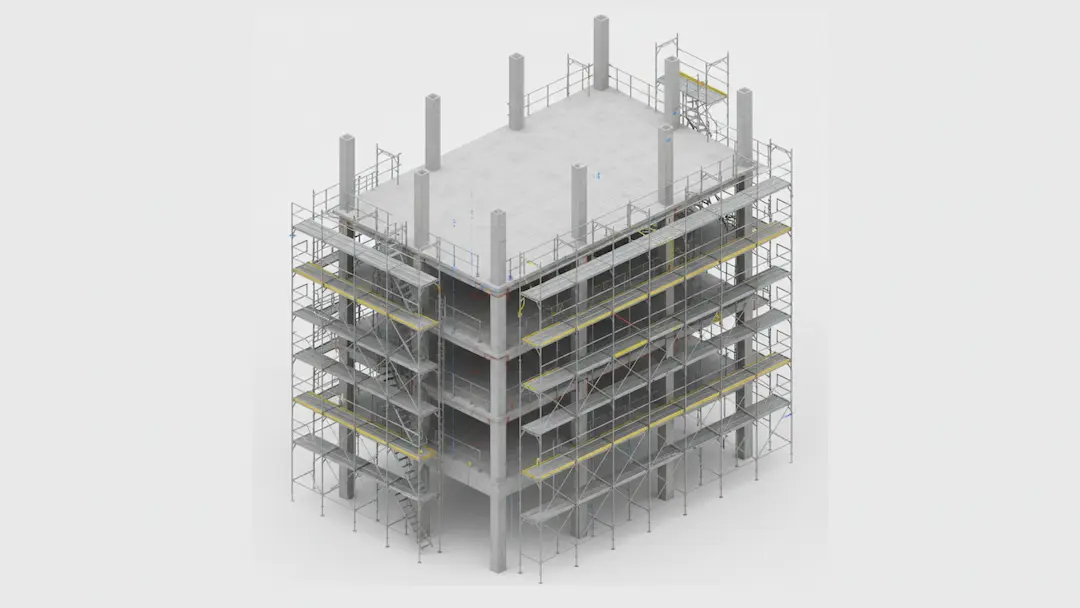
Scaffolding Automation Based on Structural BIM Models
Project Context
Scaffolding layouts are often created manually and at the last minute, requiring revisions to meet safety and structural requirements.
Automation Approach
Automation analyzed structural BIM geometry and applied rule-based placement logic to generate compliant scaffolding layouts directly from the model.
Technology Stack
Revit APIs, Dynamo, rule-based geometry analysis
Business Impact
- Faster scaffolding planning
- Improved safety compliance confidence
- Reduced manual layout iterations
HVAC BIM Automation for High-Density Layouts
Project Context
Dense HVAC systems involve complex routing, T-junctions, and frequent collisions, making manual coordination time-consuming and error-prone.
Automation Approach
StudioKrew implemented geometry-driven HVAC routing automation that handled intersection logic and collision supervision during modeling.
Technology Stack
Revit APIs, Dynamo, routing logic, and collision detection rules
Business Impact
- Over 92% routing accuracy achieved
- Significant reduction in coordination overhead
- Engineers focused on optimization instead of corrections.
Automated MEP Code Compliance Reviewer
Project Context
MEP compliance reviews are typically conducted late, triggering cascading corrections across models and drawings.
Automation Approach
StudioKrew built an automated reviewer that continuously validates MEP models against predefined compliance rules during modeling.
Technology Stack
Revit APIs, rule-based validation engines, automated checking workflows
Business Impact
- Early detection of compliance issues
- Shorter review and approval cycles
- Reduced late-stage rework
Why These BIM Automation Cases Matter
Across these implementations, StudioKrew applies a consistent automation philosophy:
- Automation is embedded into live project workflows.
- Rules reflect engineering and regulatory intent.
- Systems are designed for maintainability and scale.
This enables BIM automation to function as a long-term delivery capability rather than a collection of one-off scripts.
Where BIM Automation Often Fails (And How to Avoid It)
BIM automation does not fail because the tools are weak.
It fails because automation is often implemented without regard for how projects actually work.
A typical failure pattern is automating tasks without first understanding workflows. Scripts are written to speed up individual steps, but the broader delivery process remains unchanged. As a result, automation solves isolated problems while introducing new friction elsewhere. When upstream decisions change, the automation breaks: not because it is wrong, but because it was never aligned to the full workflow.
Another frequent issue is over-engineering fragile scripts. In the rush to automate everything, logic becomes tightly coupled to specific project assumptions, naming conventions, or model structures. These scripts may work once, but fail quietly when reused. True automation must be resilient to variation, not optimized only for ideal conditions.
Ignoring regional codes and regulatory logic is another critical pitfall. BIM automation that does not encode local standards quickly becomes unusable in real projects. Teams are then forced to override automated outputs manually, eroding trust in the system. Automation must understand why rules exist, not just what geometry to create.
A subtle but damaging mistake is treating automation as a “set and forget” solution. Projects evolve. Codes change. Design strategies shift. Automation systems that are not designed for maintenance slowly drift out of relevance. When this happens, teams abandon them, often concluding that “automation doesn’t work,” when the real issue was governance, not capability.
Perhaps the biggest failure of all is attempting to replace engineering judgment instead of supporting it. BIM automation should reduce cognitive load, not decision-making authority. When automation tries to dictate outcomes without transparency, teams resist it. When it explains constraints and flags risks, teams adopt it.
Successful BIM automation is engineered, not hacked.
It is modular, explainable, and adaptable.
It respects workflows, regulations, and human expertise.
When these principles are followed, automation becomes invisible — not because it is absent, but because it works quietly in the background, strengthening delivery instead of disrupting it.
How BIM Automation Changes Project Economics
BIM automation does not just accelerate workflows; it fundamentally changes how project costs are created, controlled, and predicted. Instead of reacting to problems late in the delivery cycle, teams begin influencing cost outcomes earlier and with greater certainty.
1. Reducing Rework Before It Becomes Expensive
Rework is one of the most silent yet destructive cost drivers in AEC projects. Small modeling inconsistencies, missed constraints, or late coordination issues often cascade into multiple downstream corrections.
BIM automation shifts error detection upstream. Rule-based validation checks continuously monitor the model as it evolves, identifying non-compliant elements, missing parameters, or coordination risks early, when changes are still inexpensive. The economic impact is significant because fixing an issue during modeling costs a fraction of what it would during documentation or on-site execution.
Through AEC Automation, it reduces rework at its source, directly automating to protect both margins and timelines.
2. Faster Bid Cycles and More Confident Submissions
Bid preparation traditionally involves a race against time — pulling quantities, validating compliance, and assembling documentation under tight deadlines.
Automation transforms this phase by enabling rapid generation of quantities, analytical drawings, and compliance-ready outputs directly from the model. Because the data is rule-validated, teams can submit bids with greater confidence and fewer contingencies.
This speed advantage allows firms to pursue more opportunities without increasing overhead, a subtle but powerful economic shift.
3. Lower Dependency on Senior BIM Specialists
In many organizations, a small group of senior BIM experts becomes a bottleneck. They are relied upon to fix errors, validate models, and resolve coordination issues late in the process.
BIM automation redistributes this dependency. When workflows are governed by embedded rules and constraints, junior and mid-level team members can work within defined guardrails. Senior professionals focus on design intent, system optimization, and decision-making rather than repetitive correction.
From an economic standpoint, this improves team scalability and reduces burnout at the top of the talent pyramid.
4. Predictable Delivery Quality Across Projects
Manual workflows introduce variability. Two teams may follow the same standards but produce different results depending on experience, interpretation, and time pressure.
Automation standardizes execution. Models are produced, checked, and documented using the same logic every time. This consistency reduces surprises during coordination and construction phases.
Predictable delivery quality makes planning more reliable, enabling better scheduling, cost forecasting, and risk management across portfolios rather than individual projects.
5. Compression of Approval and Review Cycles
Approval delays are often caused by incomplete information, inconsistent documentation, or repeated clarification cycles.
With BIM automation, models and drawings reach reviewers in a more complete and validated state. Automated checks ensure that common compliance issues are addressed before submission, reducing back-and-forth iterations.
Faster approvals translate into shorter project cycles, which directly impacts cash flow and overall project economics.
6. Long-Term ROI Beyond Individual Projects
The most overlooked economic benefit of BIM automation is its cumulative effect over time.
Once built, automation systems improve with each project. Rules are refined, edge cases are captured, and workflows become more resilient. This creates compounding returns, as each new project benefits from prior learnings without restarting from zero.
Instead of viewing automation as a project cost, organizations begin treating it as an operational asset that delivers increasing ROI across their entire delivery pipeline.
7. From Reactive Cost Control to Proactive Cost Engineering
Ultimately, BIM automation enables a mindset shift.
Cost control moves from reacting to overruns toward engineering predictability into the process. Decisions are informed earlier, risks are surfaced sooner, and outcomes become more controllable.
This is where BIM automation stops being a technical initiative and becomes a strategic one — reshaping not just how projects are modeled but how they are delivered economically.
How BIM Automation Benefits Different Project Stakeholders
BIM automation does not affect everyone the same way, and its value is clearest when viewed through specific project roles. When implemented correctly, automation aligns incentives across teams rather than optimizing one function at the expense of another.
BIM Managers
For BIM managers, automation provides governance and consistency.
Rule-based workflows reduce dependence on manual policing of standards. Models are validated continuously, making compliance measurable rather than interpretive. This allows BIM managers to focus on system improvement instead of reactive issue resolution.
Design Engineers
For design engineers, automation removes friction.
Repetitive corrections, parameter checks, and late-stage adjustments are handled automatically. Engineers spend more time on design intent, optimization, and coordination logic rather than fixing preventable issues flagged late in the process.
Construction and Site Teams
For construction teams, automation improves clarity and trust in BIM outputs.
Models and drawings arrive with fewer inconsistencies, clearer quantities, and validated constraints. When BIM data is extended to web and mobile platforms, site teams can access reliable information without gaps in interpretation or outdated exports.
Cost and Procurement Teams
For cost and procurement stakeholders, automation brings predictability.
Quantities remain synchronized with the model, reducing the need for manual reconciliation. Early cost insights become more reliable, and changes can be assessed with confidence as designs evolve.
Enterprise and Delivery Leadership
For leadership teams, BIM automation shifts delivery from reactive to controlled.
Projects become easier to forecast, resource planning stabilizes, and dependency on individual experts is reduced. Over time, automation contributes to consistent delivery performance across portfolios, not just isolated projects.
What All Can Be Automated in Revit (In Real Project Workflows)
Revit automation works best when it aligns with how projects are actually delivered—not how tools are marketed. In practice, automation touches specific, repeatable parts of the BIM lifecycle. Below are the areas where teams consistently see real impact.
1. Family Creation and Standardization
A repetitive family setup is one of the earliest productivity drains in BIM projects.
Using the Dynamo and Revit APIs, families can be automatically generated, configured, and constrained according to predefined standards. Parameters, visibility rules, and type logic are applied consistently, ensuring that families behave predictably across projects rather than relying on individual modelers.
2. Parameter Population and Data Consistency
Manual parameter entry does not scale.
Automation allows parameters to be populated based on geometry, category, system relationships, or predefined rules. Dynamo handles logic-driven population, while APIs enforce consistency and validation. This ensures that schedules, quantities, and reports always rely on structured, reliable data.
3. Rule-Based Modeling Logic
Beyond drawing geometry, Revit automation can encode design intent.
Placement rules, clearance constraints, minimum distances, and system relationships can be enforced automatically during modeling. This reduces downstream corrections and keeps models aligned with engineering logic as they evolve.
4. View and Section Generation
Creating views manually introduces inconsistency and consumes time late in the project.
Automation can generate plans, sections, elevations, and callouts using predefined logic that applies the correct scales, templates, and naming conventions. Views become outputs of the model state, not manual drafting tasks.
5. Sheet Creation and Documentation Assembly
Documentation workflows are highly repetitive and error-prone.
Revit APIs enable automated sheet creation, view placement, title block population, and drawing list management. This reduces the documentation rush and prevents formatting inconsistencies during delivery.
6. Model Validation and Compliance Checks
Manual reviews are often late and incomplete.
Automation allows continuous validation of models against internal BIM standards, spatial rules, and engineering constraints. Using Dynamo logic and API-based checks, issues are identified during modeling rather than during final reviews.
7. Quantity Takeoffs and Schedule Automation
Quantities are reliable only if they remain synchronized with the model.
Automation ensures that schedules and takeoffs are generated directly from validated model data and update automatically as designs change. This removes manual reconciliation between drawings, BOQs, and cost estimates.
8. Coordination Preparation for Navisworks
Poorly prepared models create noise during coordination.
Revit automation can clean, structure, and tag models before they move into Navisworks. This improves the quality of clash classification and ensures that coordination efforts focus on real issues rather than false positives.
9. Publishing Model Data via APS (Forge)
Not all stakeholders work inside Revit.
Using Autodesk Platform Services (APS / Forge), Revit model data can be published to web viewers and dashboards. Automation enables model access, data extraction, and reporting without requiring Revit licenses, extending BIM value beyond the design team.
10. Ongoing Model Audits and Health Monitoring
Automation does not stop at delivery.
Models can be continuously audited for data completeness, unused elements, performance issues, and standard violations. This keeps models clean, efficient, and easier to maintain across long project timelines.
To know more about the power of Automation, also read: The Power of Automation: How REVIT Plugins Can Streamline Your Workflow
Frequently Asked Questions About BIM Automation
Larger automation systems that include rule engines, cross-platform integration, or country-specific compliance logic typically follow a phased rollout. This ensures automation aligns with live project workflows without disrupting ongoing delivery.
Effective BIM automation does not hard-code assumptions. Instead, it uses rule-based logic that can reference regional datasets, parameters, and constraints. This allows the same automation framework to support multiple countries while applying the correct local codes.
This approach is particularly important for global organizations operating across regions such as India, the Middle East, Europe, and North America.
Rather than replacing existing processes overnight, automation is typically layered in stages—starting with validation, documentation, or data extraction workflows. This minimizes disruption while delivering immediate benefits.
Many teams successfully adopt automation mid-project to reduce rework, improve consistency, and stabilize delivery during later phases.
Automation removes repetitive and error-prone tasks, allowing BIM managers, engineers, and coordinators to focus on design decisions, optimization, and coordination strategy. Teams become more scalable without increasing headcount, but human expertise remains central to the process.
When automation is parameter-driven and rule-based, the same workflows can be reused across projects with different sizes, building types, and geographies. Over time, automation becomes more robust as edge cases are identified and incorporated.
This scalability is what transforms automation from a project tool into an organizational capability.
Automation can clean, standardize, and structure CAD drawings before converting them into BIM-ready information. CAD-to-Revit automation reduces manual remodeling effort and preserves historical project intelligence that would otherwise be lost.
This makes automation especially valuable for renovation, retrofit, and brownfield projects.
Instead of generating large volumes of unclassified clashes, automation prepares models using rules that control geometry, parameters, and discipline alignment. This results in more meaningful coordination sessions focused on real issues rather than false positives.
The outcome is faster resolution and fewer late-stage surprises.
Using platforms like Autodesk Platform Services (APS / Forge), BIM data can be published to web dashboards and mobile applications. This allows site teams, managers, and non-BIM stakeholders to interact with model data without needing authoring software.
This integration improves collaboration and decision-making across the project lifecycle.
- Repetitive in nature
- Highly regulated
- Large or multi-phase
- Spread across multiple locations
As standards evolve, codes change, and workflows mature, automation must be maintained and refined. Organizations that invest in automation as a long-term capability consistently achieve better delivery stability and ROI over time.
- Reduction in rework and corrections
- Faster documentation and approval cycles
- Improved data consistency
- Reduced dependency on senior BIM resources
The Future of BIM Automation: Rules, AI, and Connected Systems
The future of BIM automation will not be driven solely by tools. It will be shaped by how well rules, intelligence, and systems are connected to real project workflows. The direction is clear, but it is more practical than promotional narratives suggest.
1. Rule-Based Systems Will Remain the Backbone
Despite the rise of AI, deterministic rules will remain the foundation of BIM automation.
Engineering codes, safety regulations, and compliance standards demand predictable behavior. Rule engines ensure that models respond consistently to constraints, validations, and design logic. Without strong rule foundations, automation quickly becomes unreliable, especially on regulated or large-scale projects.
2. AI as an Assistant, Not a Decision Maker
AI’s real value in BIM automation lies in assistance, not authority.
AI can help identify patterns, highlight anomalies, suggest optimizations, and flag areas of risk based on historical data. However, final decisions, especially those related to safety, compliance, and constructability, will remain subject to rules and human oversight.
This balance keeps automation trustworthy.
3. Continuous Model Validation Instead of Milestone Reviews
Future BIM workflows will move away from periodic model checks.
Automation will enable continuous validation as models evolve, catching issues the moment they are introduced. This shifts quality control from a reactive review process to a proactive design companion, significantly reducing late-stage corrections.
4. BIM Models Becoming Intelligent Containers
Models will no longer be treated as static representations.
They will increasingly function as containers of logic, constraints, relationships, and decisions. Automation will allow models to explain why something exists, not just what exists, improving transparency across teams.
5. Stronger Integration with Web and Mobile Systems
The future of BIM automation is not confined to authoring tools.
Connected systems will allow BIM intelligence to flow into web dashboards, mobile applications, and site tools in near real time. Automation will manage synchronization, permissions, and data consistency, reducing reliance on manual exports and screenshots.
6. Automation Across the Full Project Lifecycle
Automation will increasingly span beyond design and documentation.
Construction planning, site validation, quantity tracking, and facility handover processes will be driven by the same automated logic established during modeling. This continuity reduces information loss between project phases.
7. Scalable Automation Architectures Over One-Off Scripts
The industry will move away from fragile, project-specific scripts.
Future-ready BIM automation will be modular, configurable, and maintainable, capable of adapting to new codes, regions, and project types without requiring a rebuild from scratch. This is where automation becomes an operational asset rather than a technical experiment.
8. Fewer Tools, Better Connected Workflows
Ironically, progress will come not from adding more tools, but from reducing fragmentation.
Automation will increasingly focus on minimizing tool-hopping, duplicate data entry, and manual coordination. Connected workflows, not isolated software, will define mature BIM environments.
9. Practical Innovation Over Buzzwords
The most successful BIM automation initiatives will avoid hype.
They will focus on solving specific problems: reducing rework, improving accuracy, accelerating delivery, and enabling collaboration. AI, cloud platforms, and automation will be used where they add clarity, not complexity.
10. The Future Is Engineered, Not Disrupted
BIM automation will not “disrupt” the industry overnight.
It will be engineered gradually through improved rules, more intelligent systems, and tighter integration across design, construction, and operations. Firms that treat automation as a long-term capability, not a trend, will define the next phase of digital delivery.

Conclusion: BIM Automation as an Engineered Capability, Not a Shortcut
BIM automation succeeds when it is treated as an engineered system rather than a collection of scripts.
Across real projects, the value of automation becomes clear only when it is grounded in workflow understanding, regulatory logic, and long-term maintainability. Automating isolated tasks may offer short-term gains, but rarely survives changing project conditions, regional requirements, or scaling demands.
Well-designed BIM automation reduces manual effort without reducing control. It improves accuracy without slowing teams down. Most importantly, it shifts project delivery from reactive correction to proactive coordination, where issues are identified early, decisions are informed by reliable data, and outcomes become more predictable.
As BIM environments grow more complex and interconnected, automation will increasingly function as the backbone of delivery rather than an add-on. Systems that integrate rules, data intelligence, and connected platforms will define how teams scale quality, not just speed.
Organizations that invest in BIM automation as a long-term capability, refining it across projects, adapting it to codes, and embedding it into daily workflows, build resilience into their delivery processes. The result is not just faster projects, but more consistent and dependable ones.
In that sense, BIM automation is no longer about automating tasks.
It is about delivering with confidence, at scale, and with intent.






 INDIA
INDIA CANADA
 USA
USA UAE
UAE